How Do I Pull Large Meta Ads Reports Safely?
How do I pull large Meta ads reports without timeouts?
Break the request into smaller ones. Meta says timeouts are the most common reason report calls fail and suggests splitting by date range, fewer ad IDs and fewer metrics, avoiding heavy breakdowns, and using asynchronous reports for large volumes. Try small synchronous requests first, then move big pulls to asynchronous jobs.
A spreadsheet that fills in for one campaign but spins for the whole account is a familiar sight. The cause is usually not a broken connector but a request that asks Meta for too much at once. Meta’s own guidance for its Insights reporting service explains where the limits are and how to work inside them. This article puts it in terms a marketing or e-commerce team can use when a report keeps failing.
Why do large Meta reports time out?
According to Meta’s Insights best practices, the most common problem with report calls is too many requests and timeouts. Synchronous requests can run out of memory or time out. Asynchronous requests can time out too, and Meta says an asynchronous request, including retry attempts, can take up to an hour when it fetches a large volume of data across many ad-level objects.
Meta also says there is no explicit limit at which a query will fail. When one times out, the advice is to break it into smaller queries with filters such as a date range.
What are the data-per-call limits?
Beyond timeouts, Meta caps how much data one request may retrieve. It describes two kinds of limit: the number of rows in the response, and the number of data points needed to compute totals, such as a summary row. These apply to both synchronous and asynchronous report calls and return an error when exceeded.
Meta’s advice for staying under them:
- Limit the date range or the number of ad IDs.
- Request only the metrics you need, or split metrics across several requests.
- Avoid account-level queries that combine detailed breakdowns, such as by product ID, with long ranges like lifetime.
- Pull granular data from lower-level objects, for example listing campaigns that had impressions first, then querying each campaign.
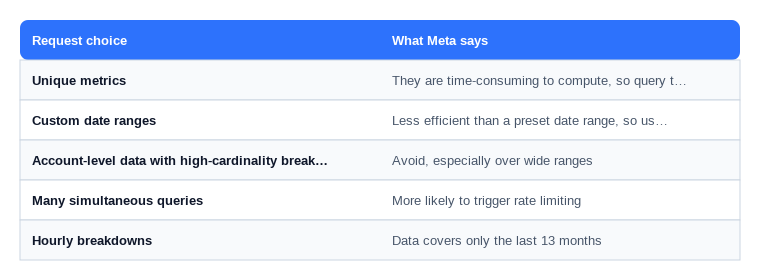
Which requests are the most expensive?
| Request choice | What Meta says |
|---|---|
| Unique metrics | They are time-consuming to compute, so query them in a separate call |
| Custom date ranges | Less efficient than a preset date range, so use a preset when you can |
| Account-level data with high-cardinality breakdowns | Avoid, especially over wide ranges |
| Many simultaneous queries | More likely to trigger rate limiting |
| Hourly breakdowns | Data covers only the last 13 months |
Meta also advises filtering so that results include only ad objects that have data, instead of asking for every object in the account.
When should a tool use asynchronous reports?
Meta’s recommendation is to try synchronous calls first and use asynchronous calls when they time out, and to use batch requests for several synchronous calls. The asynchronous flow in plain words: the tool submits a report job, Meta returns a report ID, the tool checks the job until it shows as completed, then downloads the results. Meta’s rate limit page also names asynchronous requests as the way to query a huge amount of insights data. Job states include not started, running, completed, failed and skipped. A skipped job has expired and must be submitted again.
Two practical details: Meta says the report run ID expires after 30 days, so a tool should not rely on an old job, and if a report fails, the newer API versions return the error code and message by default.
Why do numbers change between pulls?
Meta says insights refresh every 15 minutes and do not change after 28 days from reporting. Metrics may keep updating for a couple of days after an ad finishes, so a report pulled the day an ad ends can differ from one pulled later. Data is also reported in the ad account’s time zone, which matters when you schedule daily pulls.
Since June 10, 2025, Meta says its API responses mimic Ads Manager settings for attribution: values follow the ad set’s attribution setting, and actions use mixed report timing, with on-Meta actions timed by impression and off-Meta actions such as web purchases timed by conversion. The page adds that the API’s default behaviour still differs from Ads Manager’s unless a developer sets a particular option, so a tool’s totals can differ from your screen for reasons unrelated to timeouts. For a full explanation, read why reporting windows differ from optimization windows.
What changed for reach and old data?
Meta says that, beginning June 10, 2025, reach is no longer returned for standard queries that apply breakdowns and use start dates more than 13 months old. Related fields such as frequency are also omitted. Asynchronous jobs can still retrieve it, up to 10 requests per ad account per day, and once that limit is breached the requests omit reach. If a historical report shows blank reach or frequency, this rule is a likely reason.
What should I ask my reporting tool or agency?
- Do you split long date ranges into smaller requests automatically?
- Do you use asynchronous reports for large accounts, and what happens when a job fails or expires?
- Which breakdowns are you requesting, and are any heavy ones, such as product-level, run at account level?
- Why do your totals differ from Ads Manager, and which attribution setting do you apply?
Related reading: what rate limits mean for tools, how to use breakdowns in Ads Manager and the best Meta ads tools.
Where does Bach.ai fit?
Bach.ai is our product. It audits Meta and Google Ads accounts from your synced data and flags disapproved ads as policy blockers, but it is not a general reporting or export tool and does not tune other connectors’ report requests, and findings are estimates, not guarantees. On a paid plan a supported change is applied only after you approve it by default. For a full account review, use the Meta ads audit checklist.
FAQ
Is a timeout always a Meta outage?
No. Meta says the most common issue is too many requests and timeouts, and that a query which asks for too much data can fail. Splitting the request by date range is its first suggestion.
Does an asynchronous report always finish quickly?
No. Meta says an asynchronous request can take up to an hour including retry attempts when it covers a large volume of data. A tool should poll the job rather than expecting an instant answer.
Why is my historical reach blank?
Meta says reach is omitted for standard queries with breakdowns and a start date more than 13 months old. Asynchronous jobs can retrieve it within a limit of 10 requests per ad account per day.
Can I export a finished report to a file?
Meta describes an export option that produces CSV or XLS from a report run. It warns the export format is not part of its versioned API and may change unexpectedly, so scripts should not rely on it.
Sources, read on 25 November 2026: Insights API best practices; Insights breakdowns; Rate limiting.