What Are Meta Pixel Standard Events and Parameters?
What are Meta pixel standard events and their parameters?
Standard events are predefined actions you track with fbq('track'), such as Purchase, AddToCart, Lead and ViewContent. Each accepts object properties like value, currency and content_ids. Meta's reference marks currency and value as required on Purchase, and contents or content_ids as required for Advantage+ catalog ads on several events.
Every conversion you report to Meta starts as an event name plus a small bundle of properties. Meta ships a fixed list of standard event names so its systems recognise what happened without guessing. This guide lays out that list, the properties each event accepts, the few that are mandatory, and where to place the code. If a Purchase arrives without a value or a catalog ad cannot match a product, check these fields first.
Which standard events does the Meta pixel support?
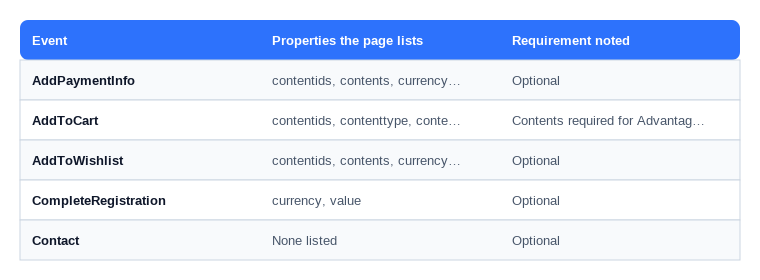
Meta’s pixel reference says you can use fbq('track') to track its standard events, and that standard events also support parameter objects with specific properties. The page lists 17 events:
| Event | Properties the page lists | Requirement noted |
|---|---|---|
| AddPaymentInfo | content_ids, contents, currency, value | Optional |
| AddToCart | content_ids, content_type, contents, currency, value | Contents required for Advantage+ catalog ads |
| AddToWishlist | content_ids, contents, currency, value | Optional |
| CompleteRegistration | currency, value | Optional |
| Contact | None listed | Optional |
| CustomizeProduct | None listed | Optional |
| Donate | None listed | Optional |
| FindLocation | None listed | Optional |
| InitiateCheckout | content_ids, contents, currency, num_items, value | Optional |
| Lead | currency, value | Optional |
| Purchase | content_ids, content_type, contents, currency, num_items, value | currency and value required; contents or content_ids required for Advantage+ catalog ads |
| Schedule | None listed | Optional |
| Search | content_ids, content_type, contents, currency, search_string, value | contents or content_ids required for Advantage+ catalog ads |
| StartTrial | currency, predicted_ltv, value | Optional |
| SubmitApplication | None listed | Optional |
| Subscribe | currency, predicted_ltv, value | Optional |
| ViewContent | content_ids, content_type, contents, currency, value | contents or content_ids required for Advantage+ catalog ads |
Read the table by job. The shopping events (ViewContent, AddToCart, InitiateCheckout, Purchase) carry product data. The lead and sign-up events (Lead, CompleteRegistration, StartTrial, Subscribe, SubmitApplication) carry value and, for trials and subscriptions, a predicted lifetime value.
Which parameters are required?
Only one event has a hard requirement. The reference says Purchase requires currency and value. Meta’s Conversions API documentation also describes currency as required for purchase events and says it must be a valid ISO 4217 three-digit currency code (Custom Data Parameters). Use the same format in the pixel so browser and server events agree.
For catalog advertisers, the reference adds a second requirement: ViewContent, AddToCart, Search and Purchase need contents or content_ids (AddToCart lists contents) for Advantage+ catalog ads. If you run catalog ads, treat those fields as mandatory.
What do the object properties mean?
The reference defines the shared properties. A few details matter more than the rest:
- content_ids is an array of product IDs, such as SKUs.
- contents is an array of objects, and
idandquantityare its required fields. - content_type is either
productorproduct_group, matching what you pass incontent_idsorcontents. If you send none, Meta matches the event to every item with the same ID, whatever its type. - value is an integer or float and currency is a string.
- num_items is an integer used with InitiateCheckout.
- search_string is the text a person typed, used with Search.
- predicted_ltv is an advertiser-defined predicted lifetime value of a subscriber, used with StartTrial and Subscribe.
The Conversions API page adds that content_type should be product_group when the keys in content_ids are product groups, which distinguish identical products that vary by colour, material, size or pattern.
How do I add a standard event to my site?
Meta’s implementation guide shows each event as an fbq('track', ...) call after the base code is installed. The base code must already be on every page where you track events.
- Install the pixel base code on every page you want to track.
- Pick the standard event that matches the action, such as Lead for a sign-up.
- Call
fbq('track', 'Lead', { value: 40.00, currency: 'USD' })on the page or action where it happens. - Place the Purchase call on the payment confirmation page, with
contents,valueandcurrency. - For a button action, tie the call to the element, for example an
onClickhandler. - Use
trackCustomonly when no standard event fits.
The page notes that Meta Ads Data Advisor expects load events, so button-tied events may appear differently there.
How does this connect to the Conversions API?
If you run the pixel alongside the Conversions API, Meta recommends adding the eventID parameter as a fourth parameter to fbq('track'). It is what lets Meta match the browser event to its server twin. For the matching rules, see how event deduplication works and our Meta pixel and Conversions API guide.
Where does Bach.ai fit?
Bach.ai is our product. It audits Meta and Google Ads accounts and checks tracking and signal health, including pixel and Conversions API event coverage and deduplication. It does not write or install your pixel code, and findings are estimates, not guarantees. On a paid plan a supported change is applied only after you approve it by default. For a wider review, use the Meta ads audit checklist. If purchases arrive without amounts, read why Meta purchase events are missing value.
FAQ
Do I have to use standard events instead of custom events?
Meta describes standard events as the predefined set you track with fbq('track'), and custom events as tracked with trackCustom. Choose a standard event whenever one matches the action, because the reference ties them to named conversion types.
Which events need value and currency?
The reference marks Purchase as requiring both. Lead, CompleteRegistration, StartTrial and Subscribe also list them as properties, so send them there when you know the amount. Do not send a made-up value to fill the field.
What happens if I leave out content_type?
Meta says that when no content_type is provided, it matches the event to every item with the same ID, independent of its type. Send product or product_group so the event matches the right catalog item.
Do I need eventID on every event?
It matters when the same event reaches Meta from both browser and server. Meta recommends the fourth eventID parameter in that setup. Without it, deduplication has less to work with.
Sources, read on 25 November 2026: Meta pixel reference; Meta pixel implementation: Marketing API; Conversions API custom data parameters.