How to Hash Customer Data for the Conversions API
How do I hash and format customer data for the Conversions API?
Normalize each field first, then SHA-256 hash it. Trim and lowercase email, strip phone numbers to digits with the country code, and use lowercase two-letter codes for state and country. Never hash client_ip_address, client_user_agent, fbc or fbp. The Business SDK hashes for you.
A hash is only useful to Meta if it matches the hash Meta computes on its own side, and that only happens when the input is formatted the same way. A stray space or a capital letter produces a completely different value. This guide lists Meta’s formatting rule for each customer field, which fields you must leave unhashed, and which combinations Meta treats as too thin to match.
What does Meta require before I hash?
Meta’s customer information parameters page says its systems are designed not to accept unhashed contact information, meaning names, email addresses and phone numbers, unless noted. It also says you must provide at least one user_data parameter with the correct formatting in each request. Its Payload Helper adds that all customer information parameters should be hashed as SHA256, except client IP address, client user agent, click ID and browser ID, and that other unhashed parameters are automatically rejected.
The working order is: normalize, then hash, then send. Hashing a value that is still formatted wrongly produces a different hash from the one Meta expects.
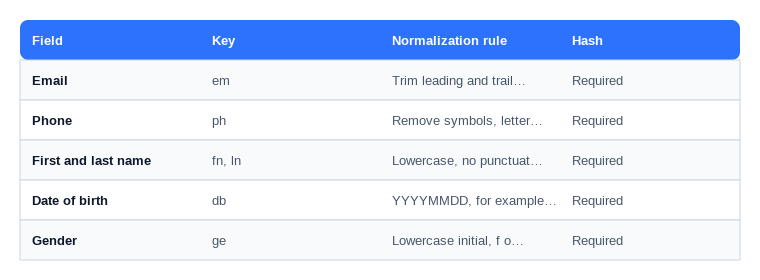
How do I normalize each field?
| Field | Key | Normalization rule | Hash |
|---|---|---|---|
| em | Trim leading and trailing spaces, convert to lowercase | Required | |
| Phone | ph | Remove symbols, letters and leading zeros; include the country code | Required |
| First and last name | fn, ln | Lowercase, no punctuation; UTF-8 for special characters | Required |
| Date of birth | db | YYYYMMDD, for example 19970216 | Required |
| Gender | ge | Lowercase initial, f or m | Required |
| City | ct | Lowercase, no punctuation, special characters or spaces | Required |
| State | st | Two-character ANSI code in lowercase; elsewhere lowercase with no punctuation or spaces | Required |
| Zip code | zp | Lowercase, no spaces, no dash; first 5 digits for US | Required |
| Country | country | Lowercase ISO 3166-1 alpha-2 code | Required |
| External ID | external_id | Any unique advertiser ID | Recommended |
Meta’s own examples show the pattern. The input John_Smith@gmail.com normalizes to john_smith@gmail.com, and the page gives its SHA-256 output as 62a14e44f765419d10fea99367361a727c12365e2520f32218d505ed9aa0f62f. The US number (650)555-1212 becomes 16505551212. United States becomes us. Use these as unit-test fixtures: if your code produces a different hash from the same input, your normalization differs from Meta’s.
Two details save rework. First, always include the country code in phone numbers, even if all your customers are in one country. Second, always include the country field for the same reason; Meta says it matches on a global scale.
Which fields must I not hash?
Meta marks these as “Do not hash”:
client_ip_address, which must be a valid IPv4 or IPv6 address with no spacesclient_user_agentfbc(click ID) andfbp(browser ID)subscription_id,fb_login_idandlead_id
Hashing the IP address or user agent is a common slip because they sit next to email in the same object. If you also run the pixel, remember that for browser events the IP and user agent are added automatically, but for server events you must configure them manually.
Does the Business SDK hash for me?
Yes. Meta says that if you use the Meta Business SDK, the hashing is done automatically. Its best-practice page lists code samples in Python, Java, Ruby, PHP and Node and says that, if you are not planning to use the SDK, you should implement hashing yourself.
How do I hash customer data step by step?
- Collect the raw value at the moment the customer gives it to you, such as the checkout email.
- Trim spaces and lowercase it, or apply the field’s rule from the table.
- Check that phone numbers carry a country code and contain digits only.
- Compute the SHA-256 hash of the normalized UTF-8 string.
- Compare your output with one of Meta’s published examples for the same input.
- Send the hash in
user_data, and leave IP, user agent,fbcandfbpunhashed. - Paste a test payload into the Payload Helper and fix any error it flags.
Which combinations does Meta reject?
Meta’s best-practice page says an event is invalid if its customer information consists only of one of these combinations, or a subset of them: ct + country + st + zp + ge + client_user_agent; db + client_user_agent; fn + ge; or ln + ge. So an event with only gender, city, state and country would be rejected. Add at least one strong identifier, for example hashed email or phone, as covered in how to improve event match quality.
Where does Bach.ai fit?
Bach.ai is our product. It audits Meta and Google Ads accounts and checks tracking and signal health, including pixel and Conversions API event coverage. It does not hash or send your server events, and findings are estimates, not guarantees. On a paid plan a supported change is applied only after you approve it by default. For the wider picture read the Meta pixel and Conversions API guide, and for the pixel side see what advanced matching is.
FAQ
Should I hash the email before or after lowercasing?
After. Meta’s rule is to trim leading and trailing spaces and lowercase the email, then hash the result. Its worked example turns John_Smith@gmail.com into john_smith@gmail.com before the hash is calculated, so build your function in that order.
Do I hash external_id?
Meta marks hashing as recommended for external_id. If you send the same ID through other channels such as the pixel, Meta says it should be in the same format as when sent through the Conversions API.
What happens to unhashed email?
Meta says its systems are designed not to accept unhashed contact information, and the Payload Helper says unhashed parameters that should be hashed are automatically rejected. Hash before sending, and test one real order through the Payload Helper before you switch the integration on.
Can I send several emails for one person?
Meta lists email, phone and the name fields as string or list of strings, so you can send multiple values. The Payload Helper also offers an add-another-value option.
Sources, read on 25 November 2026: Customer information parameters; Conversions API best practices; Payload Helper.