What Is Advanced Matching on the Meta Pixel?
What is advanced matching on the Meta pixel?
Advanced matching sends customer details such as email, first name, last name and phone along with pixel events so Meta can match more website actions to people. You add it as a third parameter to the fbq('init') call in the base code, or turn it on automatically in Events Manager.
Advanced matching is the pixel’s way of attaching a visitor’s contact details to the events it already sends. Meta’s glossary describes it as a feature that sends hashed customer information, for example email, alongside pixel events to improve attribution. This guide covers how to switch it on by hand, the exact format of each field, and the one placement mistake that stops manual values from counting.
How do I turn on advanced matching manually?
Meta’s advanced matching page says to format the visitor’s data as a JSON object and include it in the pixel base code fbq('init') call as a third parameter. For example, em, fn and ln go in the object after the pixel ID. The page says the pixel hashes the values automatically with SHA-256.
The warning that matters: place the parameters in the pixel base code, or the values will not be treated as manual advanced matching values. A call made later on the page is not equivalent.
Meta also notes that it accepts both lowercase unhashed and normalized SHA-256 hashed email addresses in these calls. The same page points to Events Manager if you would rather implement advanced matching automatically.
Which fields can I send, and in what format?
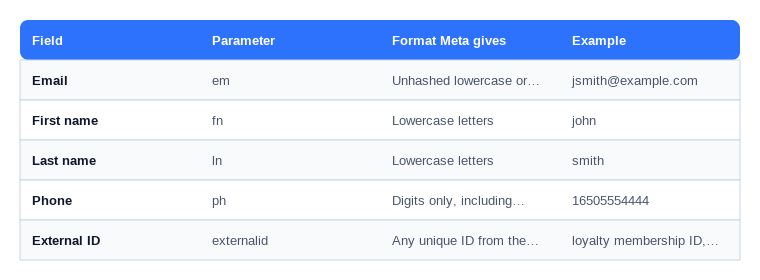
The reference table on the page lists eleven fields. Follow the format exactly, because a value that is formatted differently from Meta’s example is a different value.
| Field | Parameter | Format Meta gives | Example |
|---|---|---|---|
| em | Unhashed lowercase or hashed SHA-256 | jsmith@example.com | |
| First name | fn | Lowercase letters | john |
| Last name | ln | Lowercase letters | smith |
| Phone | ph | Digits only, including country code and area code | 16505554444 |
| External ID | external_id | Any unique ID from the advertiser | loyalty membership ID, user ID |
| Gender | ge | Single lowercase letter, f or m; blank if unknown | f |
| Birthdate | db | Digits only: year, month, then day | 19910526 |
| City | ct | Lowercase with any spaces removed | menlopark |
| State or province | st | Lowercase two-letter code | ca |
| Zip or postal code | zp | String | 94025 |
| Country | country | Lowercase two-letter country code | us |
Meta’s example for external ID names loyalty membership ID, user ID and external cookie ID as valid sources. Choose an identifier you can also send from your server, so the same person carries the same ID in both channels.
What is the difference between manual and automatic advanced matching?
Manual means you write the object in your base code and control which fields go out. Automatic is the route Meta points to when it says to use Events Manager to implement advanced matching automatically. Meta’s Data Advisor documentation also lists “Configure Advanced Matching for improved conversion matching” among the setup jobs it can handle. If you use a tag manager or a store platform, check which of these your setup already uses before adding a second copy.
Can I send pre-hashed data through an image tag?
Yes. Meta’s page says you can use the image tag to pass your own visitor data if you format and hash it with SHA-256 first. The example adds ud[em], ud[fn] and ud[ln] to the pixel request URL, with hashed values, alongside cd[value] and cd[currency]. Hash after normalizing: lowercase the email first, then hash. Meta’s Conversions API documentation says its systems are designed not to accept unhashed contact information, so the next step is to hash and format customer data for the Conversions API.
How do I add advanced matching to my pixel?
- Decide which fields you can collect lawfully at the moment the pixel loads, such as email after login.
- Normalize each value to the format in the table: lowercase, digits only, two-letter codes.
- Add the JSON object as the third argument to
fbq('init')in the base code. - Load a page and check the events in Meta’s Test Events or the Data Advisor extension, which shows Advanced Matching data per event.
- Send the same fields from your server so both channels describe the same person. How to improve event match quality covers that side.
Where does Bach.ai fit?
Bach.ai is our product. It audits Meta and Google Ads accounts and checks tracking and signal health, including pixel and Conversions API event coverage. It does not write your pixel code or collect visitor data, and findings are estimates, not guarantees. On a paid plan a supported change is applied only after you approve it by default. Start with the Meta pixel and Conversions API guide or the Meta ads audit checklist.
FAQ
Does the pixel hash the data for me?
Meta’s page says values passed in the init call are hashed automatically by the pixel using SHA-256. For the image tag route, you must format and hash the data yourself before sending it.
Where must the advanced matching code go?
In the pixel base code, as the third parameter of fbq('init'). Meta warns that values placed elsewhere are not treated as manual advanced matching values, so a call on a later page script does not count.
Which fields should I send first?
Meta lists email, phone, names and location fields. Start with fields you already hold reliably, usually email and phone with country code, and format them exactly as shown. Do not send guesses.
Is gender required?
It is a listed field, not a mandatory one. Meta says to send a single lowercase letter, f or m, and to leave the field blank if the value is unknown.
Sources, read on 25 November 2026: Meta pixel advanced matching; Conversions API customer information parameters; Meta Ads Data Advisor.