How Do I Preview a Meta Ad Before Publishing?
How do I preview a Meta ad before publishing?
Meta can generate a preview from an existing ad ID, an ad creative ID or a creative spec you supply, so you can see an ad before it is created. You choose a placement format such as desktop feed or mobile feed. Previews made from an ad account are visible only to people with a role on it.
A preview is the cheapest quality gate in paid social: you see the headline, image, button and layout as a person would, before the ad spends anything. Meta documents a preview feature that tools and ad platforms use to render those mock-ups. This guide explains what it can preview, how placements differ and which checks to run so a bad crop or wrong link never goes live.
What can Meta preview?
Meta’s ad preview documentation says you can preview existing ads and generate previews of ads you want to create, based on the ad creative. There are three ways to start:
- An ad ID, for an ad that already exists.
- An ad creative ID, for a saved creative.
- A creative spec you supply, which lets you preview an ad before the ad or creative exists.
Meta also notes that for ad previews a tool should use a user access token rather than a Page access token. If you use a connected tool and previews fail, that is one of the things a vendor may check. Meta’s access rules are covered in what access a Meta ads tool needs.
How do placement formats change the preview?
You choose an ad format when you request a preview, and the same creative can look very different by placement. Meta’s page shows formats such as the standard desktop feed, the standard mobile feed, the Instagram Explore home grid and Instagram search results. The request returns an ad preview object that contains an embedded frame showing the ad.
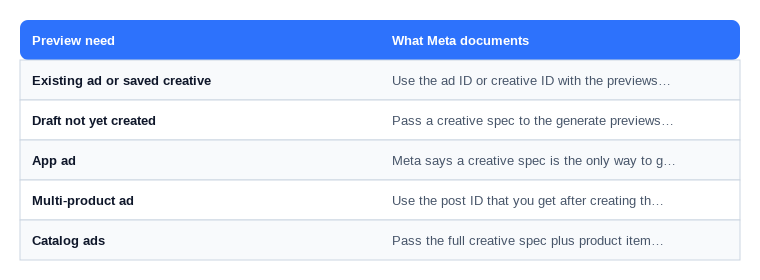
| Preview need | What Meta documents |
|---|---|
| Existing ad or saved creative | Use the ad ID or creative ID with the previews edge |
| Draft not yet created | Pass a creative spec to the generate previews edge |
| App ad | Meta says a creative spec is the only way to generate a preview for an app ad |
| Multi-product ad | Use the post ID that you get after creating the multi-product ad |
| Catalog ads | Pass the full creative spec plus product item IDs |
| Audience Network | Call previews on the ad with a banner, interstitial or native format |
Who can see a preview?
This is the detail that surprises teams that share previews with clients. Meta says previews generated from an ad account are visible only to people who have a role on that ad account, while previews generated through the generate previews edge are visible to anyone. If you share a preview link, find out which type it is before you send it to someone outside your organisation.
How do I preview catalog ads?
Advantage+ catalog ads need extra input because the product is chosen at delivery time. Meta’s catalog ads guide says you can generate previews of your dynamic creative with the ad previews endpoint, specify the product item ID parameter, or give several product item IDs to preview a carousel ad. Meta’s preview page adds that for these ads you pass the entire creative spec.
For a store, the check is whether the title, price and image in the template match what the catalog actually holds. Read what Advantage+ catalog ads need for the setup, and what a catalog holds for the data behind it.
What do I check in a preview?
Treat a preview as a short checklist, written here as advice rather than a Meta rule:
- Look at the first line of text and the headline. Check spelling and any claim you cannot support.
- Check the image or video crop in every placement you plan to use, not only the feed.
- Check the button and where the link goes.
- For product ads, open previews for more than one product, including one with a long title.
- Check the preview against the policy rules for your category before you submit.
Previews show layout. They do not tell you whether Meta will approve the ad, so keep your policy check separate. See Facebook ad rejected, how do I appeal? if an ad is turned down after review.
What if a preview does not display?
Meta’s error reference includes error code 2606, described as “Unable to display a preview of this ad.” Meta does not give a cause for that code on that page, so treat it as a prompt to check the creative inputs, the format you requested and the permissions of the user whose token was used. If a tool shows this error, ask the vendor for the underlying message rather than retrying blindly.
What should I ask a tool vendor?
- Which placements can your tool preview, and are the previews rendered by Meta or approximated?
- Are the previews I share visible only to people with an ad account role, or to anyone with the link?
- Can I preview catalog ads with specific products?
- What happens when a preview fails?
Where does Bach.ai fit?
Bach.ai is our product. It audits Meta and Google Ads accounts and flags disapproved ads as policy blockers, but it does not render ad previews or replace the preview in Meta’s tools, and findings are estimates, not guarantees. On a paid plan a supported change is applied only after you approve it by default. For a full review, use the Meta ads audit checklist.
FAQ
Can I preview an ad that does not exist yet?
Yes. Meta says you can generate previews of ads you want to create by supplying a creative spec. The preview is based on the creative you describe, so no ad or creative record is needed first.
Are previews private?
It depends on how they are made. Meta says previews from an ad account are visible only to people with a role on the account, while previews generated through the generate previews edge are visible to anyone.
Can I preview an Instagram placement?
Meta’s page shows Instagram Explore home grid and Instagram search results formats. Request the ad format for the placement you plan to use, then check crop and text in that view.
Which token does a preview need?
Meta says to provide a user access token, not a Page access token, for ad previews. If a connected tool cannot show previews, the token type is one thing to check.
Sources, read on 25 November 2026: Ad previews and generate previews; Advantage+ catalog ads, get started; Error reference; Audience Network.