How Do I Create a Website Custom Audience on Meta?
How do I create a website custom audience on Meta?
Open Audiences in Ads Manager, select Create audience, Custom audience, then Website. Choose your pixel, which visitors to include and the audience retention in days, then name it. The Meta Pixel must be installed and tracking standard events, custom events or custom conversions before you start.
A website custom audience lets you retarget people who visited your store but did not buy, using the events your Meta Pixel records. The steps are short; the failures come from missing events and from expecting the audience to match your traffic count. This guide uses Meta’s pages on website custom audiences, creating one and troubleshooting its size, read on 25 November 2026. Menus change, so confirm in Ads Manager.
What do I need first?
Meta lists three requirements: the Meta Pixel installed on your website and tracking standard events, custom events or custom conversions; standard or custom events configured; and the pixel confirmed active. Meta also says how soon you can use the audience depends on your traffic and when you placed the pixel. If the pixel is not firing purchases, fix it first: Why does the Meta Pixel track PageView but not Purchase?, and for Shopify setups How do I connect Shopify to Facebook Ads?.
How do I create it?
- Open Audiences in Meta Ads Manager and click Create audience, then Custom audience.
- Choose Website and click Next.
- Select your pixel from the dropdown.
- Choose which website visitors to include, for example people who triggered a specific standard or custom event, matching any or all of your criteria.
- Under Audience retention, enter the number of days visitors remain in the audience after visiting.
- Name the audience and click Create audience.
Meta adds that you can create a lookalike from the new audience, and that Meta may enhance your audience using on-platform events.
How do I narrow it with event parameters?
After selecting an event, use the parameter entry box. Standard parameters appear in a dropdown; custom parameters must be typed exactly as sent through the pixel, SDK or Conversions API, since the name is case-sensitive and space-sensitive, then you set a value. Meta’s example: a purchase event with plan_type equal to premium. For a store, a parameter such as a product category or order value lets you build, for example, buyers of one collection.
What can I use website audiences for?
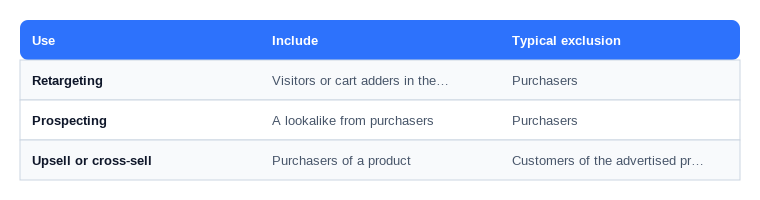
Meta lists retargeting people who visited in the last 30 days but have not converted, prospecting for people similar to existing customers, and upselling or cross-selling to purchasers. Which ones to build first for a store is in Which custom audiences should an online store build first on Meta?, and window length is in Meta ads retargeting window design.
| Use | Include | Typical exclusion |
|---|---|---|
| Retargeting | Visitors or cart adders in the last 30 days | Purchasers |
| Prospecting | A lookalike from purchasers | Purchasers |
| Upsell or cross-sell | Purchasers of a product | Customers of the advertised product |
Why is my website audience smaller than my traffic?
Meta says visitors must also be Meta technologies users, accounts that opted out of online behavioral advertising are not included, pixel fires are not unique visitors, and it may not include some iOS 14 users. Its example: 20,000 visitors viewing 7 pages produce about 140,000 pixel fires on a page, while the audience may be near 2,857 unique visitors. Meta also notes different tools measure differently and numbers should not be expected to line up. See What does estimated audience size mean in Meta Ads?.
How do I check that it works?
After creating the audience, open Audiences and check its status and size. Meta says the size column can show Unavailable or Populating even when an audience is Ready, for privacy reasons, so confirm by opening an ad set and reading the estimated audience size when you add the audience. Then run a simple test: visit your store in a clean browser session, view a product, and see whether the audience grows after the next refresh. If the audience stays empty, open Events Manager and confirm the event you chose is firing with the parameters you expect. Keep a list of every website audience, its event, retention days and creation date so you can retire unused ones and avoid overlap between similar audiences in the same ad set.
Bach.ai is our product. Its audit includes tracking and signal health (pixel, Conversions API, event coverage and deduplication) and ranks findings by estimated recoverable spend. On a paid plan a supported change is applied on Meta or Google Ads only after you approve it by default (Auto-Pilot is opt-in); the free trial does not apply changes, and recoverable-spend figures are estimates, not guarantees. For a hands-on review, use the Meta Ads audit checklist.
FAQ
Do I need the Conversions API?
Meta’s page names the pixel, SDK or Conversions API as ways to send events. Server events improve reliability but the pixel is the minimum for this audience.
How many days should I choose?
Meta leaves the choice to you and lists a 30-day retargeting example. Start there and adjust by purchase cycle.
Can I add parameters?
Yes. Standard parameters appear in a dropdown; custom ones must be typed exactly, case and spaces included.
Why is the audience empty?
Common causes are an inactive pixel, events not tracked, or too little traffic since the pixel was installed, as Meta notes.
Sources, read on 25 November 2026: How to create a website custom audience in Meta Ads Manager; About website custom audiences; Troubleshoot website custom audience size.