How AI Budget Allocation Works on Meta and Google
How does AI budget allocation work on Meta and Google Ads?
On Meta, Advantage+ campaign budget spreads one campaign budget across ad sets in real time, toward the best opportunities. On Google, shared budgets let unused budget flow to capped campaigns and Smart Bidding sets bids per auction. Both reallocate without asking you, so judge results at campaign level and cap what any tool may change.
AI budget allocation is not a feature you buy; it is already running in most accounts. Meta and Google each move money automatically, inside the limits you set. The practical questions are how each one decides, when its decisions are reliable, and what to check before you add a third-party tool that also moves budget. Everything below comes from the platforms’ own help pages, read on 24 November 2026.
How does Meta’s AI move budget between ad sets?
Meta’s Advantage+ campaign budget is the mechanism. You set one central campaign budget, and Meta says it “continuously distributes in real time to ad sets with the best opportunities”, spending more on ad sets with the best opportunities and less on underperforming ones. The budget can be daily or lifetime, and Meta says the feature is best suited to campaigns with at least 2 ad sets.
Two details change how you read the results. Meta says it may not spend equally across ad sets: with 2 active ad sets, most of the budget can go to one. And when audiences differ a lot in size, the ad sets with the largest audiences will likely receive the most budget. Meta’s advice is to analyze results at the campaign level rather than the ad set level, using total optimization events and average cost per event.
How does Google’s AI move budget and bids?
Google splits the job in two. Budget moves between campaigns through shared budgets; bids move inside each auction through Smart Bidding.
A shared budget is a single average daily budget shared by multiple campaigns in an account. Google says underutilized budget can automatically reallocate to budget-capped campaigns, and that it is best practice to use shared budgets with portfolio bidding. Smart Bidding, which Google describes as bidding strategies that use Google AI to optimize for conversions or conversion value in every auction, includes Target CPA, Target ROAS, Maximize conversions and Maximize conversion value. Portfolio bid strategies are not available for Performance Max campaigns.
Google also states that daily spend can rise above your average daily budget: for most campaigns the daily spending limit is the average daily budget multiplied by 2, and the monthly limit is the average daily budget multiplied by 30.4.
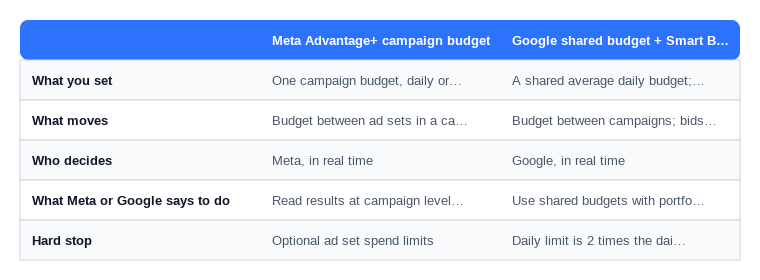
What is the difference between the two?
| Meta Advantage+ campaign budget | Google shared budget + Smart Bidding | |
|---|---|---|
| What you set | One campaign budget, daily or lifetime | A shared average daily budget; a bid goal such as Target ROAS |
| What moves | Budget between ad sets in a campaign | Budget between campaigns; bids per auction |
| Who decides | Meta, in real time | Google, in real time |
| What Meta or Google says to do | Read results at campaign level; use ad set spend limits sparingly | Use shared budgets with portfolio bidding; some strategies need a minimum volume of conversion data |
| Hard stop | Optional ad set spend limits | Daily limit is 2 times the daily average for most campaigns |
When should I trust AI budget allocation?
Trust it when the data it learns from is sound and its limits are yours. Check these four conditions first:
- Count conversions. Google says some Smart Bidding strategies rely on a minimum volume of historical conversion data, depending on campaign type; Meta says more ad sets and ads in a campaign can mean a longer learning phase.
- Confirm that conversion tracking is correct, because both systems optimize for whatever you report as a conversion.
- Leave low-delivery ad sets running. Meta warns that pausing an ad set with low delivery can raise cost per action for your active ad sets, and that pausing an ad set removes it from consideration.
- Compare results at campaign level over a full cycle, not ad set by ad set on a single day.
For the Meta side in depth, see When does Advantage+ help and when does it waste budget? and Does Advantage+ campaign budget skip or reset the learning phase?.
What should I check before a tool moves my budget?
A tool that moves budget adds a second decision-maker on top of Meta’s or Google’s. Check each of these before you connect one:
- Ask who approves a change: you per change, a rule you set, or the tool by itself. An ad-account setting should be able to block it.
- Set a ceiling. Meta’s own ads connector lets someone with full control of the business portfolio block budget changes entirely, or block any budget set above an amount you enter, such as $1,000. Ask any tool for an equivalent cap.
- Throttle the pace. Meta says that when you adjust campaign settings, you should input changes in bulk, because one at a time may send the campaign back into learning each time. See how many hourly AI budget edits Meta tolerates.
- Find the log. In Ads Manager, open Activity history and filter by Changed by to see whether a person, an automated rule or an authorized business identity made each change.
- Rehearse the rollback: know how to restore the previous budget by hand and whether the tool can.
- Start with read-only recommendations for a few weeks and compare them with what you would have done.
Bach.ai is our product. It reviews budget and bidding and flags spend on weak ad sets, and on an active paid plan it applies a Meta or Google Ads change, by default, only after you approve it, with every change logged. It is the wrong fit if you want budget moved with no approval step; Auto-Pilot exists on paid plans but is off by default, and high-risk changes always wait for you.
To split budget between the two platforms in the first place, read How do I split my ad budget between Meta and Google Ads?, and for a diagnostic pass, the Meta ads audit checklist.
FAQ
Is Advantage+ campaign budget better than ad set budgets?
Not always. Meta says to consider ad set budgets when you have strict budget requirements for each ad set, and that too many spend limits reduce the flexibility its delivery system needs. Use campaign-level budget when you want Meta to find the best opportunities across ad sets.
Can Google overspend my daily budget?
Within limits. Google says that on some days it may spend less than your average daily budget and on others more, but you will not pay more than the daily spending limit, which is twice the average daily budget for most campaigns, or the monthly limit of 30.4 times it.
Should an AI tool control my budget on a small account?
Be careful: both platforms need enough conversions to learn, and Google says some Smart Bidding strategies depend on a minimum volume of conversion data. With little data, a human-set budget and a recommendation-only tool are safer than an autonomous one.
Do shared budgets work with Performance Max?
Google states that portfolio bid strategies are not available for Performance Max campaigns. For budget behavior in Performance Max, read Google’s Performance Max help page before assuming shared-budget and portfolio behavior carries over.
Sources
Sources, checked 24 Nov 2026: Meta Business Help Center, About Advantage+ campaign budget, Best practices for Advantage+ campaign budget, About ad set spend limits, Manage ads from an AI agent with Meta ads AI connectors, How to view activity history for your ads; Google Ads Help, About Smart Bidding, About shared budgets, Budgets overview, Portfolio bid strategy definition; Bach.ai access rules from our pricing page.