How to Report Meta Ads Results to Clients
How do I report Meta ads results to clients?
Build a custom report in Ads Reporting for the client's ad account and date range, include spend, purchases, revenue, ROAS and cost per purchase, then schedule it by email. Reconcile revenue against the client's store orders, label estimates, and end with what changed and what you will do next.
Clients rarely want 40 columns. They want to know whether the money worked, whether they can trust the number, and what you will do about it. A good report is short, repeatable and honest about what Meta can and cannot measure, and Meta’s own tools can produce most of it.
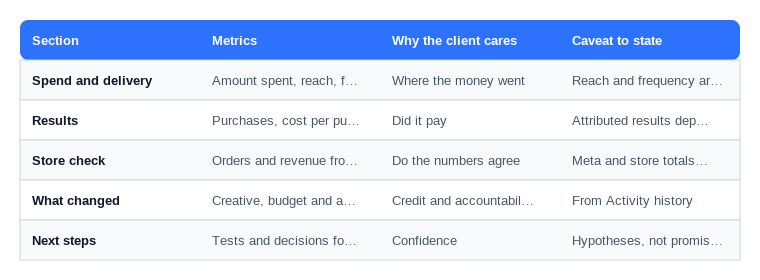
What should a client report contain?
| Section | Metrics | Why the client cares | Caveat to state |
|---|---|---|---|
| Spend and delivery | Amount spent, reach, frequency | Where the money went | Reach and frequency are Meta-side |
| Results | Purchases, cost per purchase, ROAS | Did it pay | Attributed results depend on the attribution setting |
| Store check | Orders and revenue from the client’s store | Do the numbers agree | Meta and store totals rarely match exactly |
| What changed | Creative, budget and audience edits | Credit and accountability | From Activity history |
| Next steps | Tests and decisions for next period | Confidence | Hypotheses, not promises |
Keep one page for the client and put the breakdown tables in an appendix. For the metrics that go beyond platform ROAS, see What metrics should I track besides platform ROAS?
How do I build the report in Ads Reporting?
Meta describes breakdowns, metrics and filtering in Ads Reporting. A workable build:
- Open Ads Manager and go to Ads Reporting through the main menu under Analyze and report.
- Check the ad account (top left) and the date range (top right) before anything else.
- Click Create custom report and choose Level, then Campaign, to keep the table short.
- Add Time, then Week, so the client sees movement.
- Add the metrics: amount spent, purchases, cost per purchase, purchase conversion value and purchase ROAS.
- Add a second view with the Placement breakdown for the appendix, and save the report with the client’s name.
Meta notes that conversions it cannot attribute to a breakdown show as “Uncategorized”, and that only some breakdowns work for offsite conversions, so explain a gap rather than hiding it. For partnership ads, the Creator partner breakdown splits results by creator but cannot be combined with other breakdowns.
How do I send it automatically?
Per Meta’s recurring report article:
- Open Ads Reporting, click Reports and open the saved report.
- Turn on the schedule email option, from the link under the report name or from the cog icon in report settings.
- Add the subscriber’s email address and click Apply.
- Click Save to confirm.
Two limits matter for agencies. Scheduling is for single-account reports, and cross-account reports cannot be scheduled by email. And only people with permissions on the ad account can open the report; Meta says to export it and send the file if you want to share results without granting account access. Do that for most clients, since access is the thing you are trying to limit, as How do I manage many client ad accounts safely? explains.
How do I make the numbers trustworthy?
Three habits keep a report credible:
- Say which attribution setting you used. Meta says results cannot be compared across ad sets with different attribution models and offers a Compare Attribution Settings feature; its standard options credit clicks within 1 or 7 days and views within 1 day (attribution models and settings).
- Reconcile with the store. Show Meta’s purchases beside the client’s orders for the same dates. When they differ, explain why using Why does Meta show more purchases than Shopify?.
- Label estimates. Meta marks platform, placement and device breakdowns as estimated; carry that label into the report.
Never fill a missing number with zero or an invented rate. If a currency, date or event is missing, say so on the page.
How do I show what changed?
Open Ads Manager, select the campaign, ad set or ad and click Activity history on the right. Filter by Activity types for budgets, targeting or run status, and by Changed by to see who acted (view activity history). Meta says changes by automated rules show the rule name, so the history separates your work from automation. Paste the relevant lines into the “what changed” section so each decision has a date.
What should I say when results are bad?
Lead with the number, then the diagnosis, then the plan. Name the cause you can prove (tracking, creative fatigue, a budget cut), the cause you are testing, and the next date you will report. For a structured way to find causes, use What should I check when Meta ads ROAS drops overnight? Avoid benchmarks you cannot source; Meta ads benchmarks explains how we treat them.
Can software help?
Bach.ai reads a connected Meta account, can compare ad-reported revenue with a read-only Shopify store connection on supported plans, and shows the math behind an answer in chat. White-label reporting is part of the Agency plan, which covers up to 20 brands; see pricing for the current terms. Applying a change on Meta still needs your approval.
FAQ
How often should I report to a client?
Match the decision cycle: a short weekly note while you test, and a fuller monthly report with the store reconciliation. Meta’s scheduler lets you automate the weekly email for a single account, so the slow part is the commentary, not the export.
Can I give a client view-only access?
Yes, through ad account roles in the business portfolio, but share reports as exports when you can. Meta says only people with permissions on the account can access a scheduled report, so granting access just to read one is rarely needed.
Which metric should the headline be?
The one the client’s business runs on: purchase conversion value against spend, shown with the store’s own revenue. Use cost per purchase for the team and ROAS for the owner, and keep click metrics out of the headline.
What if the client’s numbers disagree with Meta?
Say so first. Show both sides for the same dates and name the known causes: attribution windows, view-through credit, store refunds and tracking gaps. Then agree which source of truth the contract uses.
Sources: Meta Business Help Center, About breakdowns, metrics and filtering in Meta Ads Reporting, Run a recurring report and send it to different email addresses, About attribution models and attribution settings, View activity history for your ads, View ad results by platform, device and placement (all checked 24 Nov 2026); Bach.ai plan details from our pricing page.