Best Instagram Ad Placements for an Online Store
Which Instagram placements should my store's ads run on?
Let Meta choose. On Sales, Leads and App promotion campaigns, Advantage+ placements is now the default and placement selection is removed from the ad set. Instagram then spans Feed, Stories, Reels, Explore, Search and Profile feed. Your lever is creative: supply a 9:16 video and a 4:5 image so every surface has something native.
If you sell a physical product, the placement question has changed shape. Meta says Sales campaigns now default to Advantage+ placements and removes the placement checkboxes from the ad set, so you no longer choose where Instagram shows your ad; you choose what the ad looks like when it gets there. This guide lists the Instagram surfaces, what each wants from your creative, and the one situation where manual control still makes sense.
What Instagram placements can my ads appear in?
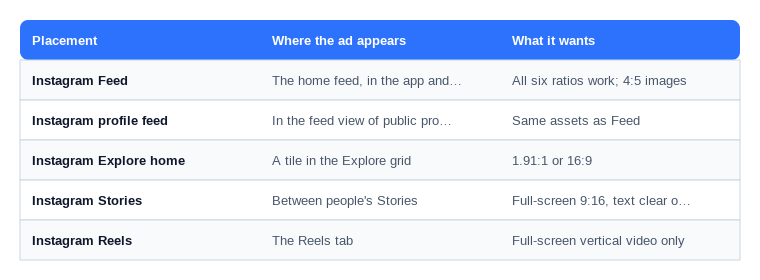
Meta lists these Instagram placements in its placements overview, checked 24 Nov 2026:
| Placement | Where the ad appears | What it wants |
|---|---|---|
| Instagram Feed | The home feed, in the app and on desktop and mobile web | All six ratios work; 4:5 images |
| Instagram profile feed | In the feed view of public profiles of people aged 18 and up | Same assets as Feed |
| Instagram Explore home | A tile in the Explore grid | 1.91:1 or 16:9 |
| Instagram Stories | Between people’s Stories | Full-screen 9:16, text clear of the edges |
| Instagram Reels | The Reels tab | Full-screen vertical video only |
| Instagram search results | Under a keyword search in the app | 1.91:1 or 1:1 |
Per Meta’s aspect ratio table, Reels supports all six ratios with 9:16 recommended, Instagram Feed accepts all six ratios, Explore home takes 1.91:1 and 16:9, and search results take only 1.91:1 and 1:1. Meta’s Feed design requirements add that taller images may be cropped to the recommended 4:5. Meta’s Instagram Explore placement article adds that tapping a tile in the Explore grid opens a Reels viewer, where Reels ads can appear.
Can I still pick Instagram placements by hand?
Depends on the objective. Meta’s placement article says Leads, App promotion and Sales now default to Advantage+ placements and remove the choice in the ad set, while Awareness, Traffic and Engagement still let you select manually. On Sales you can still open Show more settings and exclude a placement, but Meta warns that excluding one in any ad set turns Advantage+ off.
Meta also says adding placements does not raise the cost of your ad, and reports that in an experiment ad sets using Advantage+ placements had an 11.7% lower cost per action on average than manual placements (about ad placements; about Advantage+ placements). That is Meta’s own experiment, not a promise for your account, so treat it as the reason to start from the default and a reason to test before overriding it.
How do I get each Instagram placement to look native?
- Open Ads Manager and click + Create, then choose the Sales objective.
- In the ad set, leave Placements on Advantage+ so Instagram surfaces are all eligible.
- At the ad level, upload a 9:16 video and a 4:5 image so no surface forces an awkward crop.
- In the ad creative section, use asset customisation for placements to trim or crop the media per placement.
- Check the preview for Instagram Stories and Instagram Reels and move text out of the top and bottom edges.
- Publish, then read results by placement as described below.
Meta’s alternatives to excluding placements recommends asset customisation instead of excluding a placement your creative does not suit, and adds that a placement that truly cannot show a format is skipped automatically.
How do I see which Instagram placement is working?
Delivery is automated, but reporting is not hidden. In Ads Manager, open Campaigns, Ad sets or Ads, click Breakdown, then choose Platform, Placement, Platform and device, or Placement and device. Meta marks these values as estimated (view results by platform, device and placement).
Read the breakdown for creative signals, not budget orders. If Reels shows the cheapest clicks but Feed shows most purchases, the answer is usually a better vertical video, not an exclusion. The reach-versus-ROAS gap is covered in Why do Reels ads get more reach but worse ROAS than Feed?
When is manual placement control worth it?
Only for a reason Meta’s tools cannot handle. Meta says to set account controls if your business can only advertise on specific placements, and its brand-suitability tools (inventory filters and block lists) are the suggested alternative when the concern is adjacent content. A legal or brand rule is a good reason; a hunch that Stories “never works” is not.
If you do exclude, do it as a clean test: duplicate the ad set, exclude the placement in one copy, and compare cost per purchase after both leave the learning phase, as What is the learning phase? explains. Meta also offers Allow limited spending to excluded placements, which lets up to 5% of the budget flow to excluded placements when it is likely to improve performance.
Should I run Instagram only, or Instagram and Facebook?
Instagram placements sit inside the same campaign as Facebook ones; “Instagram only” means excluding the Facebook and Audience Network platforms, which is the manual setting above. The decision between platforms for a store is a separate question, answered in Should an online store run ads on Instagram or Facebook? Start with both, read the platform breakdown after a full learning period, and change only if the data gives you a reason.
Can software help?
Bach.ai audits a connected Meta account and ranks what it finds by estimated recoverable spend; it flags creative fatigue and spend on weak ad sets, and applies a supported Meta change, by default, only after you approve it (Auto-Pilot is opt-in) on an active paid plan. It does not replace the breakdown check above, which you can run free in Ads Manager. For the wider audit, use the Meta ads audit checklist.
FAQ
Do more placements cost more?
No. Meta states that adding more placements does not increase the cost of your ad; it increases the number of people who can see it and can improve results. What can cost more is a creative that suits only one surface, because the system then has fewer good places to spend.
Why are my ads not showing on Instagram?
Usually an eligibility or setup cause: the objective, an excluded placement, or no Instagram identity. Meta says you need an Instagram account or a Page acting as the voice of the ad, and images and videos that meet Feed or Stories rules. The checks are in Why are my Meta ads not showing on Instagram?
Do I need an Instagram account to use Instagram placements?
Not necessarily. Meta says you don’t need an Instagram account set up for your business to select the Instagram placement, because your Facebook Page can serve as the voice of the ad. Linking an Instagram account is still worthwhile so comments, handle and profile click-throughs look consistent.
Which Instagram placement is best for ecommerce?
Meta publishes no ranking, and results differ by account, so no placement is best for every store. Use the placement breakdown on your own purchases, with a full learning period behind each number, and treat a single week of data as a hint rather than a verdict.
Sources: Meta Business Help Center, About ad placements across Meta technologies, Choose ad placements, About Advantage+ placements, Aspect ratios supported by placements, Design requirements for Instagram Feed ads, About the Instagram ad placement, Best alternatives to excluding ad placements, View results by platform, device and placement (all checked 24 Nov 2026).