How Do I Schedule a Budget Increase for a Sale?
How do I schedule a budget increase for a sale on Meta?
Use budget scheduling on a campaign or ad set with a daily budget, and add a high-demand period for the sale. Meta caps the increase at 8 times the daily budget, each period must run at least 3 hours, and you can set up to 50 periods. Lifetime budgets cannot use it.
A sale is the one time you want more spend on a known date. The risky way is to edit the budget by hand at midnight and again at the end. Meta has a built-in feature for planned increases, with limits worth knowing before you plan a promotion around it.
What is budget scheduling?
Meta describes budget scheduling as a way to schedule budget increases for a campaign or ad set budget on days or times when you expect higher sales, peak traffic or promotional periods (About budget scheduling). It suits time-based events, such as certain days of the week or calendar dates, macro events such as festivals or sporting events, and promotional events such as sales, launches or new product dates.
What are the limits?
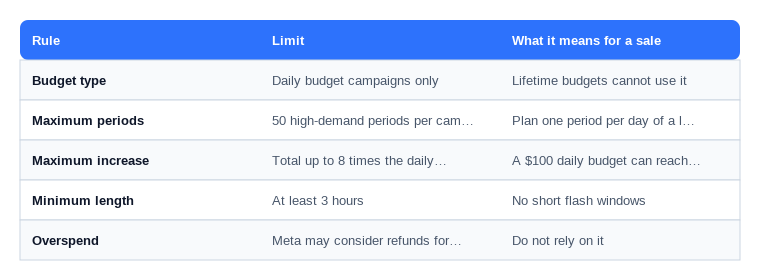
These come straight from Meta’s page:
| Rule | Limit | What it means for a sale |
|---|---|---|
| Budget type | Daily budget campaigns only | Lifetime budgets cannot use it |
| Maximum periods | 50 high-demand periods per campaign or ad set | Plan one period per day of a long sale |
| Maximum increase | Total up to 8 times the daily budget | A $100 daily budget can reach $800 in the period |
| Minimum length | At least 3 hours | No short flash windows |
| Overspend | Meta may consider refunds for spend above the maximum, depending on the case | Do not rely on it |
The $100 to $800 figure is Meta’s own example. Treat the 8x as a ceiling, not a target.
How is it different from ad scheduling?
Ad scheduling controls when ads are delivered: you set hours and days, in the viewer’s or your account’s time zone, and Meta says it can only be used with lifetime budgets. Budget scheduling raises the budget at chosen times and can only be used with daily budgets. If your campaign uses a lifetime budget, you cannot use budget scheduling; you would plan the sale another way, such as a separate campaign.
How do I plan the sale?
- Check the campaign uses a daily budget. If it does not, decide whether to create a new daily-budget campaign for the sale.
- Work out the ceiling: normal daily budget times the multiple you want, never above 8.
- Write down the exact start and end, in the ad account’s time zone.
- Add each high-demand period in Ads Manager and confirm the totals shown.
- Do not edit creative or targeting in the same window. Meta lists changes to targeting, creative and optimization event as significant edits that send an ad set back into the learning phase (Significant edits).
- Put a cost-per-purchase ceiling in writing before the sale, so you know the point at which you stop.
- After the sale, compare spend and orders against your store, not only Meta.
Does a big budget jump hurt delivery?
Meta says daily budgets are averages over a week and that on some days it may spend up to 75% over the daily budget and less on others, while never exceeding 7 times the daily budget in a week (Understand fluctuations in ad performance). That flexibility exists on some accounts already, so a scheduled increase sits on top of normal variation. It also says big changes in budget can matter: for the learning phase, Meta says whether a budget change is significant depends on its size, with $100 to $101 given as an example of not being significant. A jump to many times the budget is a different case, so watch the Delivery column after the period begins.
How big should the increase be?
Meta’s ceiling is 8 times, but the right figure is set by what your account can profitably absorb. A practical way to size it:
- Take the last full non-sale week and note spend and cost per purchase by day.
- Decide the highest cost per purchase you will accept during the sale, from your margin, using What is break-even ROAS? as the floor.
- Start with a modest multiple on the first day of the sale and read the cost per purchase after a few hours before you go higher.
- Keep the increase inside the multiple you can afford if every extra dollar converts at the sale-period cost.
For how pacing rules change as spend grows, see How should budget pacing change as I scale?. The point of a schedule is that you decided the ceiling when you were calm.
What can go wrong?
- Spending the whole increase on the first hours because demand is slow to arrive.
- A sale that sells out, while ads keep spending. Connect stock to your ad plan; What costs am I missing from my break-even ROAS? helps set the stop line.
- Forgetting the daily-budget rule and discovering the option greyed out.
- A discount that lowers margin more than the extra volume pays; run your numbers in the ad spend calculator first.
Can software help?
Bach.ai reviews budget and bidding and checks pacing against your connected store data, and it can propose budget changes for your approval by default. It does not run a promotion calendar for you. Keep the sale plan yourself; use it to check whether spend and real orders moved together.
FAQ
Can I use budget scheduling with a lifetime budget?
No. Meta says it works only with daily budgets. Ad scheduling is the feature tied to lifetime budgets.
How long must a high-demand period be?
At least 3 hours. Meta also allows up to 50 periods per campaign or ad set.
What is the maximum I can set?
The total budget during the period cannot exceed 8 times the daily budget. With a $100 daily budget, that is $800.
Will Meta refund overspend?
Meta says it will consider refunds for spend that exceeds the maximum, depending on the use case and whether the period covered a full day or part of one. Do not plan around refunds.
Sources: Meta Business Help Center, About budget scheduling, Significant edits and learning phase, Understand fluctuations in ad performance (checked 25 Nov 2026); Bach.ai capabilities from our features page.