Why Did My Boosted Post Reach Fewer People?
Why did my boosted post reach fewer people than estimated?
Meta says estimated reach is only an estimate drawn from average boosted-post performance for your audience, not a prediction. More competing boosted posts, a narrow location or language, a small audience, a low budget or weak creative can lower the real number. You are charged only for actual reach.
You boost a post, the screen says it will reach a range of people, and the result comes in lower. This is common and Meta explains it. The useful part is knowing which causes you control.
What does the estimate actually mean?
Meta says estimated people reached is only an estimate, based on several factors including the average performance of all boosted post ads targeted to your selected audience. It is meant to help you decide how much to spend and is not a prediction of how many people will see your ad once it is running (Boost post not reaching the number of people estimated). Competition for your audience, the audience size, your budget and the quality of your creative can all affect the real figure.
What makes reach go down?
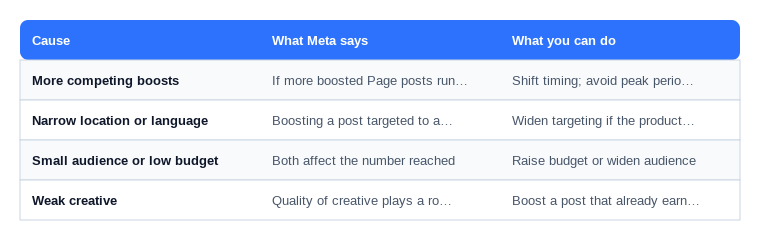
Meta names these causes:
| Cause | What Meta says | What you can do |
|---|---|---|
| More competing boosts | If more boosted Page posts run than estimated, the price rises and reach falls | Shift timing; avoid peak periods |
| Narrow location or language | Boosting a post targeted to a specific location or language may reduce reach | Widen targeting if the product allows |
| Small audience or low budget | Both affect the number reached | Raise budget or widen audience |
| Weak creative | Quality of creative plays a role | Boost a post that already earned engagement |
Meta also says you are charged only for the actual reach of your ad, and that the people you reach by boosting are in addition to the reach the post normally gets. Check the post’s insights in the Page’s Ad Center tab, where Meta shows a summary of ads created from your Page and lets you manage, edit or pause them.
Which posts are worth boosting?
Meta’s own guidance on boosting says that if a Page post has received many comments, likes and shares it likely resonated, and boosting it can reach a wider audience, including people who do not follow you (About boosted posts). It also notes that if the post keeps doing well you can re-boost it. Use that as a screen: boost posts with proven engagement, not posts you hope will work.
For Instagram, Meta recommends establishing an organic audience first, then boosting posts or stories you have already shared; you choose a goal such as more profile visits, website visits or messages, an audience, a budget and a duration, and most ads are reviewed and start to run within the hour (Get started boosting content on Instagram).
How do I check a boost properly?
- Write down the estimate and the budget before you start.
- After it ends, open the boosted post’s results and note reach, cost per result and the goal you chose.
- Compare with the estimate, and with your last two boosts, not with the estimate alone.
- Check which placements you selected. A boosted post runs only where you checked it.
- Decide what to repeat: the audience, the post type or the timing.
- If you need a result a boost cannot give, such as optimising for purchases, move to Ads Manager.
Is boosting a post better than an Ads Manager campaign? explains when to switch, and Why can’t I boost my Instagram post? covers the other direction, when the button is missing.
What should I change for the next boost?
Treat each boost as a small test with one variable. If the first boost used a narrow location, widen it and keep everything else the same. If the post was new and had few reactions, wait until it earns some before you spend. Keep a log with the date, the post, the audience, the budget, the estimate and the actual reach, so after four boosts you can see which factor moved the result and by how much. Do not read a single boost as a verdict on the content or on the platform; an estimate that is built from averages will miss in either direction on any one run. If the same post type keeps missing, the better move is usually to switch to an Ads Manager campaign with a clear goal.
Is a low reach a billing problem?
Not usually. Meta says you are charged for actual reach. If spend stops entirely, look at payment and review status instead: Why did my Meta ad spend suddenly stop with no error? lists the checks. If results look wrong against your store, compare with orders using the Meta ads audit checklist.
Can software help?
Bach.ai audits Meta and Google Ads accounts and ranks findings by estimated recoverable spend; it does not predict boost reach, and nothing can, as Meta says its estimate is not a prediction. It is more useful once you run campaigns in Ads Manager, where budget, audience and learning health can be reviewed.
FAQ
Am I charged for reach I did not get?
Meta says you are charged only for the actual reach of your ad.
Does a boosted post’s reach replace its organic reach?
No. Meta says the people reached by boosting are in addition to the reach the post normally receives.
Where do I see boosted post results?
On your Facebook Page, in the Ad Center tab, where you can view a summary of ads from your Page and manage, edit or pause them.
Should I re-boost a post that did well?
Meta says you can re-boost a post that continues to do well to attract more potential customers. Check cost per result first.
Sources: Meta Business Help Center, Boost post not reaching the number of people estimated, About boosted posts, Get started boosting content on Instagram (checked 25 Nov 2026); Bach.ai capabilities from our features page.