How Do I Get Alerted When Meta Ad Spend Spikes?
How do I get alerted when Meta ad spend spikes?
Create a notify-only automated rule on spend, set an ad account spending limit as a hard cap, and know that Meta also applies its own daily spending limit. A notify-only rule changes nothing and sends you a message, so start there and review the rule's activity log before adding any action that pauses ads.
A misplaced zero in a budget can burn a week’s spend in a day. You need a signal fast and a stop behind it. Meta provides both, and three different limits that people confuse.
Which controls does Meta give me?
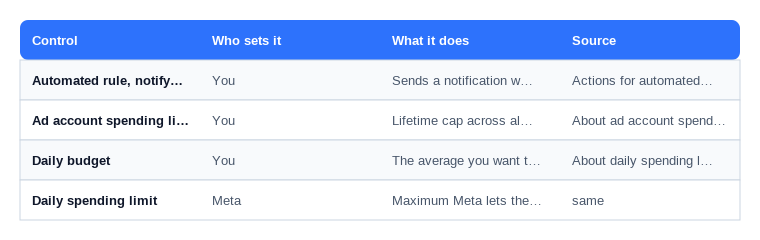
| Control | Who sets it | What it does | Source |
|---|---|---|---|
| Automated rule, notify only | You | Sends a notification when conditions are met; changes nothing | Actions for automated rules |
| Ad account spending limit | You | Lifetime cap across all campaigns; ads pause when reached | About ad account spending limits |
| Daily budget | You | The average you want to spend per ad set or campaign each day | About daily spending limits |
| Daily spending limit | Meta | Maximum Meta lets the account spend per day; ads pause until it resets | same |
Meta explains the last one: your daily spending limit is the maximum you can spend per day, set for most advertisers from their advertising and payment history, and when you reach it your ads pause and resume the next day. It usually rises automatically as you build history, follow policies and spend near your limits, and Meta may readjust it for a new portfolio or ad account, a policy violation or poor quality signals. If your ad account uses monthly invoicing, Meta does not set a daily spending limit. Check yours in Payment settings, under Current balance.
How do I set a notify-only rule?
Meta’s rules can choose the action “Send notification only”, which notifies you or other people on the ad account when the rule’s conditions are met (About actions for automated rules). You can combine conditions (Set multiple conditions).
- In Ads Manager, open the campaign or ad set menu, choose More, then Automated rules, Create a new rule.
- Choose Custom rule.
- For the action, choose Send notification only.
- For the condition, pick a spend-related condition from the list Meta offers in the rule builder (Meta documents the available conditions on its help pages), set above a figure that is higher than your normal day by a margin you choose. Check that the condition you pick measures what you intend, such as spend over a day, before you rely on it.
- Name it clearly, for example “Spend alert: over 1.5x daily budget”.
- Save, then check the rule in Manage rules and review its Activity tab to see when it fired (Manage automated rules).
How do I choose the threshold?
Use your own history. Take the highest normal day in the last 30 and add a margin. Meta notes that on some accounts spend can run up to 75% above the daily budget on some days and less on others, but will not exceed 7 times the daily budget in a week (Understand fluctuations in ad performance). A rule that alerts at 1.2 times budget will fire on normal days; one at 2 times is more useful as an alarm. Illustrative: with a $200 daily budget, a spend alert at $400 flags real trouble while ignoring the 75% flex that gives $350.
What should happen when the alert fires?
- Open Ads Manager, sort by amount spent today, and find the campaign or ad set.
- Check whether the budget was edited; open activity history, as in How do I prove what I changed in a client’s ad account?.
- Check whether a new ad set or scheduled budget increase started; see How do I schedule a budget increase for a sale on Meta?.
- If it is wrong, pause the object and tell the account owner.
- Log the time, the cause and the fix.
Who should receive the alert?
Send it to at least two people, one of whom can act at night or at weekends. Meta says a notification can go to you or other people on the ad account, so add the account owner and a backup. In an agency, decide whether the client also gets alerts; many prefer a short message from you with the cause and fix rather than a raw rule notification. Test the rule once on a low threshold so you know what the message looks like and that it reaches the right inbox.
Alerts fail quietly when people filter them. Name the rule clearly, keep the count of alerts low and review the rule’s Activity tab monthly. A rule that fires daily is a rule nobody reads; raise the threshold. A rule that never fires may be set too high, or may be measuring the wrong level. Compare it with a day when you know spend was unusually high, such as a sale.
Should the rule pause ads?
Not at first. Run notify-only for two weeks and compare alerts with real problems. Only then consider a second rule that turns an ad set off at a hard threshold; the risk is that a good ad set gets paused. Meta’s rule results show whether a rule took no action, sent a notification or turned objects off. For the account-level backstop, How do I set a spending cap on a client’s ad account? explains the limit; and the Meta ads audit checklist covers the weekly review.
Can software help?
Bach.ai checks pacing against budget on connected accounts and can flag spend on weak ad sets, but it works on audit cycles and does not replace an alarm inside Ads Manager. Use Meta’s rule for the instant alert and any tool for the weekly review.
FAQ
Will a notify-only rule stop spend?
No. It only sends a notification. Meta lists it as a separate action from turning ads off.
Is the daily spending limit the same as my daily budget?
No. Meta says the daily spending limit is set by Meta, the account limit and daily budget are set by you.
Why did my ads pause with no rule and no limit hit?
You may have reached Meta’s daily spending limit; Meta says ads pause and resume the next day when it resets.
Who gets the notification?
Meta says it can go to you or other people on your ad account; check the rule’s notification settings.
Sources: Meta Business Help Center, About actions for automated rules, Set multiple conditions for automated rules, Manage automated rules, About ad account spending limits, About daily spending limits set by Meta, Understand fluctuations in ad performance (checked 25 Nov 2026); Bach.ai capabilities from our features page.