How Do I Explain Meta Attribution to Clients?
How do I explain Meta attribution differences to a client?
Show both numbers side by side and name the attribution setting. Meta counts conversions within windows such as 7-day click and 1-day view, credits impressions, and can miss people with ad blockers, while a store or analytics tool counts differently. Align time zone, window and conversion date before you compare.
“Meta says 80 purchases and Shopify says 55. Who is lying?” Nobody, and the client needs a calm explanation, not a defence. This guide gives you the reasons Meta documents, a one-page script and a checklist to narrow the gap.
Why do the numbers differ?
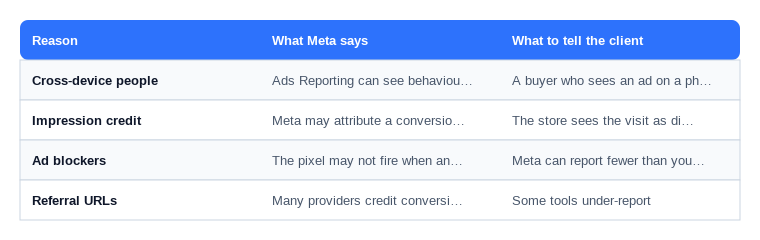
Meta says its Ads Reporting conversion counts may differ from a third-party tool because tools detect, define and calculate conversions differently (About conversion count differences). The reasons it names include:
| Reason | What Meta says | What to tell the client |
|---|---|---|
| Cross-device people | Ads Reporting can see behaviour across devices; cookie-based tools may not | A buyer who sees an ad on a phone and buys on a laptop is counted by Meta |
| Impression credit | Meta may attribute a conversion to an ad someone saw without clicking | The store sees the visit as direct or organic |
| Ad blockers | The pixel may not fire when an ad blocker is used | Meta can report fewer than your own data |
| Referral URLs | Many providers credit conversions by referrer | Some tools under-report |
What does “attribution setting” mean?
Meta’s attribution page explains that with standard attribution, advertisers choose whether to credit a conversion by ad impressions, clicks and engagements, and in what period (About attribution models and attribution settings). The standard settings include click-through (events within 1 or 7 days after a link click), view-through (within 1 day after an impression) and engage-through (within 1 day after a non-link click action). Meta says results cannot be compared in the Campaign Overview table across ad sets with different attribution models, and that comparing across models leads to inaccurate conclusions; use the Compare Attribution Settings feature, or evaluate in your external analytics tools.
Meta’s compare tool lets you view reported conversions over settings including 1-day view, 1-day click, 7-day click and 28-day click, regardless of the setting you optimise for, with exceptions for iOS 14 and above app campaigns (How to compare attribution settings).
What checklist narrows the gap?
Meta’s troubleshooting steps for a mismatch are practical (Troubleshoot common reporting differences):
- Check the attribution window matches in both tools.
- Check both are set to the same time zone.
- Check the conversion date selection is the same; Ads Reporting lets you report by time of conversion or time of exposure.
- Check the pixel fires correctly by comparing raw fires in Events Manager.
- If values differ but counts match, check currency, decimal places and variables in the purchase event.
- If Meta reports more than the other tool, check for duplicate pixel fires; if fewer, check how the pixel is installed through a tag manager.
Our deeper guides: Why does Meta show more purchases than Shopify? and Why do Meta and my store report different purchase counts?.
What if the client also looks at GA4?
Then there are three numbers, and the same logic applies to each: different tools, different rules. Pick one source of truth for money, usually the store’s orders, and one for ad-to-ad comparison, usually Meta with a fixed attribution setting. Put UTM parameters on every ad so the analytics tool can credit sessions to the ad, and name the tools in the report footer. Why do Meta and GA4 report different numbers? walks through the reconciliation in order.
Resist the urge to “fix” the gap by switching to whichever setting makes Meta look closest to the store. Changing the setting changes what is counted, not what happened, and Meta warns that comparing across models leads to inaccurate conclusions. If you do change it, log the date on the report so the next quarter’s comparison is fair.
What do I say in the meeting?
Use five sentences you can say out loud:
- “Meta and your store measure different things, so they will not match exactly.”
- “Meta credits the ad if someone saw or clicked it within a window; your store counts the sale once.”
- “We report both, with the window named, so you can see the range.”
- “We make budget decisions on your store’s orders, and use Meta’s numbers to compare ads against each other.”
- “If the gap grows suddenly, that is a tracking problem, and we check it first.”
How do I show it on the report?
Put a two-column block at the top: Meta-reported purchases and revenue with the attribution setting named; store orders and revenue for the same dates and time zone; and the ratio between them. Track the ratio over time. A stable ratio is a measurement fact; a ratio that jumps is a diagnostic signal. The Meta ads audit checklist includes the tracking steps, and How do I build white-label Meta ads reports for clients? shows the layout.
Can software help?
Bach.ai compares ad-reported revenue with real orders from a read-only Shopify connection, and shows margin ROAS where product costs are available; the figures depend on connected and current data, and a missing input can leave a finding inconclusive. It does not settle which number is right. It makes the gap visible with its inputs named.
FAQ
Should I report the store number or Meta’s number?
Both, labelled. Use the store’s orders for money decisions, and Meta’s figures to compare ads and audiences against each other.
Does a 1-day view window inflate results?
It can credit an ad for a purchase someone might have made anyway. That is why the setting must be named on every report.
Can I change the attribution setting mid-campaign?
You can, but Meta says results cannot be compared across ad sets using different models. Note the date you change it.
Why did the gap widen this month?
Check the six steps above first: a pixel change, a time zone setting, a new checkout or a tag manager edit are common causes.
Sources: Meta Business Help Center, About conversion count differences between Meta Ads Reporting and third-party reporting tools, Troubleshoot common reporting differences, About attribution models and attribution settings, How to compare attribution settings (checked 25 Nov 2026); Bach.ai capabilities from our features page.