What Are Engagement Custom Audiences on Meta?
What is an engagement custom audience on Meta?
An engagement custom audience is people who engaged with your content across Meta, such as video viewers, lead form openers, Instagram account visitors, event responders or Page followers. You choose a retention window in days, it refreshes constantly, and it can also seed a lookalike audience.
Engagement audiences are the retargeting list you can build without a pixel, because they use actions people took on Facebook and Instagram. This guide uses Meta’s pages on engagement custom audiences, custom audiences generally and lead form audiences, read on 25 November 2026. Meta has been changing Pages and account menus, so check Ads Manager.
What counts as an engagement audience?
Meta says an engagement custom audience is made up of people who have engaged with your content across Meta technologies and services, to show ads to people who already engaged or to seed a lookalike. Engagement means actions such as viewing videos, following a Facebook Page or opening a form in a lead generation ad.
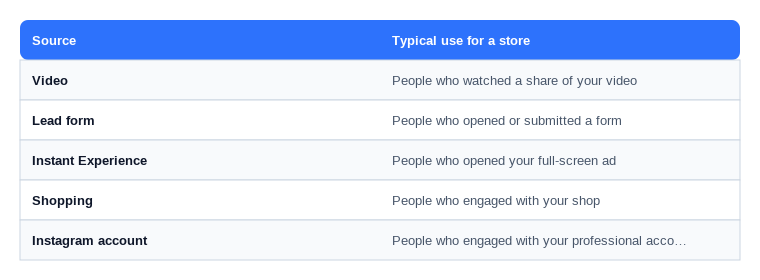
| Source | Typical use for a store |
|---|---|
| Video | People who watched a share of your video |
| Lead form | People who opened or submitted a form |
| Instant Experience | People who opened your full-screen ad |
| Shopping | People who engaged with your shop |
| Instagram account | People who engaged with your professional account |
| Events | People who responded to an event |
| Facebook Page | People who engaged with your Page |
How is it different from a website audience?
Meta says both take people’s actions into account, but an engagement audience uses actions taken across Meta technologies, whereas a website custom audience uses actions taken on your website, known as events, tracked by the Meta Pixel. Website audiences need the pixel working; engagement audiences do not. For store retargeting you usually need both, as laid out in Which custom audiences should an online store build first on Meta?.
How does the retention period work?
You choose how many days of engagement to include. Meta’s example: with 30 days, someone who engaged 29 days ago is included, and if they do not engage again in the next day they are removed. Anyone who engages within the period is added. The audience refreshes constantly, so you do not need to edit it or create a new one unless you want to change the period or the type of engagement.
How do I create one?
Meta’s lead form version shows the pattern.
- Open Audiences, then Create audience, then Custom audience.
- Choose the source, for example Lead form, then Next.
- Pick the engagement type from the Events dropdown, then your Page, then the form.
- Enter the Retention in days.
- Name the audience, add a description and select Create audience.
Other sources follow the same flow with their own options. Pick the shortest window that still gives enough people, then check the audience size in the ad set; see What does estimated audience size mean in Meta Ads?.
What are the limits?
Meta notes you cannot create new ad sets using audiences based on a deleted Facebook Page, which includes engagement audiences, their lookalikes and special ad audiences, and saved audiences that include them. Audience options are limited for audiences that include people under 18 in some countries. Because engagement audiences depend on Meta data you do not own, treat them as a supplement and also build a customer list audience: How do I create a customer list audience on Meta?. A related option for chat is Can I build a Meta custom audience from WhatsApp engagement?.
How should a store use them?
- Build a video engagement audience from your best prospecting video and retarget it with a product ad.
- Build an Instagram account audience for people who already follow your content and test an offer.
- Exclude past purchasers, as in Suppression audiences.
- Compare cost per purchase against a plain prospecting ad set for a few weeks before scaling.
Which engagement source should a store try first?
Start with the source that matches your current content. If you run video prospecting, a video audience gives you warm viewers without any site tracking. If you post often on Instagram, an Instagram account audience captures people who interacted with the profile. If you already run lead forms, the lead form audience helps retarget openers who did not finish. Use a 30 to 60 day window to begin, measure its size, and shorten the window if frequency climbs. Always exclude purchasers so you do not pay to retarget customers.
Bach.ai is our product. Its audit reads your Meta ad sets and flags audience saturation and overlap risks, ranking findings by estimated recoverable spend. On a paid plan a supported change is applied on Meta or Google Ads only after you approve it by default (Auto-Pilot is opt-in); the free trial does not apply changes, and recoverable-spend figures are estimates, not guarantees. For a hands-on review, use the Meta Ads audit checklist.
FAQ
Do I need the Meta Pixel for engagement audiences?
No. Meta says engagement audiences use actions taken across Meta technologies, not on your website.
How often does it update?
Meta says it refreshes constantly, adding new engagers and removing people who fall outside the window.
Can I use it as a lookalike source?
Yes. Meta says an engagement custom audience can be a source for a lookalike audience.
What happens if my Page is deleted?
Meta says you cannot create new ad sets with audiences based on a deleted Page, including engagement audiences and their lookalikes.
Sources, read on 25 November 2026: About engagement custom audiences; About custom audiences; How to create a lead form engagement custom audience.