How Do I Create and Reuse a Saved Audience on Meta?
How do I create and reuse a saved audience on Meta?
Build the audience at the ad set level and select Save audience, or open Audiences and choose Create audience, then Saved audience. In a new ad set choose Use a saved audience. Meta says edits update every campaign using it, and Advantage+ audience is on by default unless you switch to original options.
A saved audience stores targeting settings, such as age, gender, language and detailed targeting, so you can reuse them across ad sets. It saves time and also creates a risk: editing one saved audience can change many live campaigns. This guide follows Meta’s help pages on saved audiences and shared audiences, read on 25 November 2026. Meta has been changing audience options around Advantage+, so confirm in Ads Manager.
How do I create a saved audience?
There are two routes, per Meta.
- In Ads Manager, create the audience at the ad set level, select Save audience, name it and select Save. Meta says this option is not available if you selected Further limit the reach of your ads or Further limit your audience.
- In Audiences, select Create audience, then Saved audience, choose your settings and select Create saved audience.
Meta says Advantage+ audience is selected by default when you save an audience, and that you can turn it off with Switch to original audience options. You can find saved audiences later by filtering the Audiences list by Type and ticking Saved audience.
How do I use a saved audience in a new ad set?
At the ad set level, select Use a saved audience below Audience. Meta describes what happens in an Advantage+ audience campaign: if your saved audience uses Advantage+ audience it is applied with no changes; if it does not, Advantage+ audience is applied by default, with your settings applied as suggestions where possible (custom and lookalike audience inclusions, detailed targeting, age and gender) and other settings applied as controls with slight changes. To use a saved audience that does not use Advantage+ audience, select Further limit the reach of your ads or Further limit your audience first, then Use a saved audience.
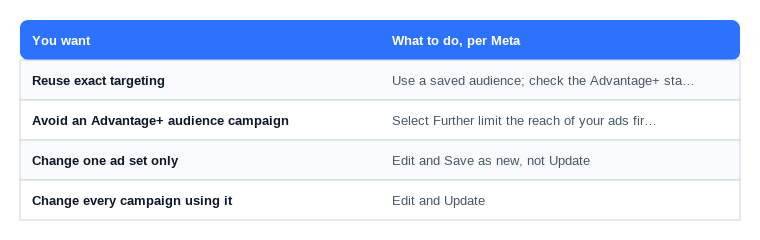
| You want | What to do, per Meta |
|---|---|
| Reuse exact targeting | Use a saved audience; check the Advantage+ state after applying |
| Avoid an Advantage+ audience campaign | Select Further limit the reach of your ads first |
| Change one ad set only | Edit and Save as new, not Update |
| Change every campaign using it | Edit and Update |
What happens when I edit a saved audience?
Meta says that if you edit your saved audience, your changes update all existing campaigns using it, and updates may take some time. Treat a saved audience like shared code: edit it only on purpose, and use Save as new to make a variant. Any settings in account controls should also align with your saved audience. Editing live targeting can restart learning; see What resets the Meta learning phase and Which edits send a Meta ad back to review?.
What about deleted Pages and sharing?
Meta notes that you cannot create new ad sets with audiences based on Facebook Pages that have been deleted, and that this includes engagement custom audiences, associated lookalikes, special ad audiences and saved audiences that include an engagement custom audience. Sharing is a separate feature: Meta’s shared audiences page says you can share custom and lookalike audiences between ad accounts and agencies, and that the owner and recipient both need a business portfolio. Deleting a shared audience also deletes it from the recipient account and pauses active ad sets that include it, so review before deleting.
When should a store use saved audiences?
They suit stable, repeated targeting: the same age range, language and interests across ad sets. They suit poorly where the audience is a changing custom list, which should be a custom audience. Which custom audiences to build is in Which custom audiences should an online store build first on Meta?, and how Advantage+ treats suggestions is in Advantage+ audience controls and suggestions.
How do I keep saved audiences tidy?
Name each saved audience with its country, age range and purpose, such as “UK 25-44 skincare”, so nobody edits the wrong one. Keep a short list of which campaigns use which audience, because Meta says edits update every campaign using it. Delete audiences you no longer use after pausing the ad sets that include them. Review the list quarterly, and before any edit to a live audience, duplicate it with Save as new and move one ad set across as a test. That keeps a bad edit from reaching every campaign at once.
Bach.ai is our product. Its audit reads your Meta ad sets and flags audience problems such as saturation, ranking findings by estimated recoverable spend. On a paid plan a supported change is applied on Meta or Google Ads only after you approve it by default (Auto-Pilot is opt-in); the free trial does not apply changes, and recoverable-spend figures are estimates, not guarantees. For a hands-on review, use the Meta Ads audit checklist.
FAQ
Do saved audiences include custom audiences?
Meta’s page says saved audience settings include things like custom and lookalike audience inclusions, which are applied as suggestions in an Advantage+ audience campaign.
Will editing a saved audience affect live ads?
Yes. Meta says edits update all existing campaigns using the saved audience, possibly after some delay.
Can I turn off Advantage+ audience in a saved audience?
Yes. Meta says to select Switch to original audience options when creating it in Audiences.
Can I share a saved audience with another ad account?
Meta’s shared audiences page covers custom and lookalike audiences only, so do not assume saved audiences can be shared.
Sources, read on 25 November 2026: How to create, edit and use saved audiences; Find a saved audience; About shared audiences.