Which Edits Send a Meta Ad Back to Review?
Which edits send a Facebook ad back to review?
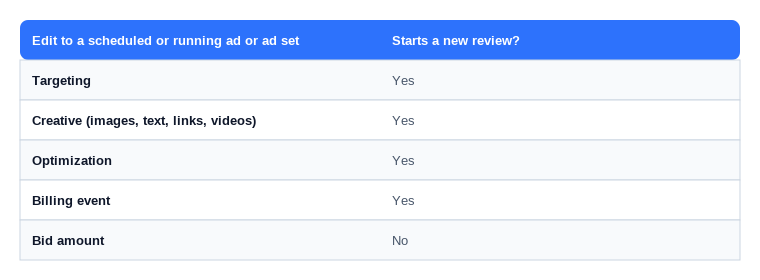
Meta says changes to targeting, creative such as images, text, links or videos, optimization or the billing event start a new review of a scheduled or running ad or ad set. Changes to bid amount, budget or ad set schedule will not trigger review. Ads can also be re-reviewed at any time.
Editing a live ad is how most stores fix performance, and it is also how an ad that was delivering ends up waiting in review. Meta’s help center lists exactly which edits restart review, and separately warns that some edits restart learning. This guide uses Meta’s pages on ads in review, rejected ads, enforcement and editing, read on 25 November 2026. Meta revises these lists, so confirm before a large edit.
Which edits trigger a new review?
| Edit to a scheduled or running ad or ad set | Starts a new review? |
|---|---|
| Targeting | Yes |
| Creative (images, text, links, videos) | Yes |
| Optimization | Yes |
| Billing event | Yes |
| Bid amount | No |
| Budget | No |
| Ad set schedule | No |
Meta says the review process starts automatically after you create or edit an ad, and that you can see the status in the Delivery column of Ads Manager. Review may cover images, video or text, targeting information, ad destination, special ad categories and advertiser permissions.
How long does review take?
Plan launches around the review window. Meta says most ads are reviewed within 24 hours, though in some cases it may take longer, and that ads may be reviewed again, including after they are live. It also says an ad may not be reviewed against all policies before delivering impressions, and that all ads are subject to re-review at any time. If an ad is stuck, see Why is my Facebook ad stuck in review?.
Does an edit also reset learning?
Separately, Meta’s editing page says editing certain details of a campaign, ad set or ad may restart the learning phase or cause the ad review system to re-review the ad. A budget change avoids review according to the list above, but large budget moves can still affect delivery; see What resets the Meta learning phase. Meta also says there is no option to reverse a published change and no way to distinguish the metrics before and after the edit.
What if the edit gets the ad rejected?
When an ad is rejected, Meta says you receive an email and a link to Business Support Home with the reason. You can edit the ad, which is automatically resubmitted for another review, create a new ad, or request another review if you believe it was rejected incorrectly. Meta warns that if you delete the ad you may lose the ability to request another review, and that you can be restricted for severe or repeated violations. If you request a review, Meta says it aims to decide within 48 hours. Our appeal guide is Facebook ad rejected: how do I appeal?.
How do I edit safely?
- Decide whether the change needs a creative edit; if you can change budget or schedule instead, those do not trigger review.
- If you must change targeting or creative, duplicate the ad set and test the new version beside the live one.
- Edit outside peak sale hours so a review delay does not cost you a launch window.
- Check the Delivery column after saving.
- Keep the old version until the new one is approved and delivering, then switch the old one off.
Which edits are safest on a winning ad?
Our judgement, based on Meta’s list: bid, budget and schedule changes avoid review, so use them first when you want to adjust spend. For creative, avoid editing the winning ad itself; duplicate it into a new ad in the same ad set and change one thing, so the original keeps delivering. For targeting changes, create a new ad set instead of editing a live one, since editing targeting starts review and may also affect learning. Keep a note of what changed and when, because Meta says it cannot separate metrics before and after an edit. That log is what lets you judge the change later, and it is the cheapest protection against blaming the wrong edit.
Bach.ai is our product. Its audit flags ad sets stuck in Learning limited and spend on weak ad sets on Meta, and on a paid plan can apply a supported change after approval. On a paid plan a supported change is applied on Meta or Google Ads only after you approve it by default (Auto-Pilot is opt-in); the free trial does not apply changes, and recoverable-spend figures are estimates, not guarantees. For a hands-on review, use the Meta Ads audit checklist.
FAQ
Does changing the budget trigger review?
Meta says changes to bid amount, budget or ad set schedule will not trigger review. Learning effects are separate.
Can a live ad be rejected later?
Yes. Meta says ads may be reviewed again, including after they are live, and all ads are subject to re-review at any time.
Will a successful appeal count against me?
Meta says that if an ad rejection is successfully overturned, it will not count as an ad violation.
Should I delete a rejected ad?
Not if you may want to appeal. Meta says deleting may remove your ability to request another review.
Sources, read on 25 November 2026: About ads in review; How to troubleshoot a rejected ad; About the enforcement of Meta Advertising Standards; How to edit ad campaigns in Meta Ads Manager.