Can You Run Instagram Ads Without an Account?
Can I run Instagram ads without an Instagram account?
Yes. Meta says your Facebook Page can be the voice of your Instagram ads: choose an objective that supports Instagram, keep Instagram in placements and select the Page in the Identity section. You can add an Instagram account later with Connect account, and the Instagram ad preview confirms eligibility.
Many stores start on Facebook and want to reach Instagram without first building a profile. Meta’s help center says that is allowed, and it also describes the cleaner long-term setup with a connected professional account. This guide follows Meta’s pages on running Instagram ads with a Page, creating Instagram ads in Ads Manager and advertising on Instagram, read on 25 November 2026. Meta revises these steps often, so check the live pages if a button has moved.
Can I really use my Facebook Page instead of an Instagram account?
Meta says you can run ads on Instagram without an Instagram account by using your Facebook Page as the voice of your Instagram ads: create the ad in Ads Manager and select your Facebook Page in the Identity section. Its general advertising page repeats the point under “Easy setup”: you do not need to set up an Instagram account for your business if you do not have time, because your Facebook Page can be used to run the ad.
What are the steps?
- Open Ads Manager and go to ad creation.
- At the campaign level, choose an objective that supports Instagram.
- At the ad set level, review budget, audience and placements; Advantage+ placements and Advantage+ audience are on by default, and manual options remain.
- At the ad level, connect a Facebook Page under Identity.
- Under Instagram account, check the connected Page is selected as the voice of the ad, or click Connect account to add an Instagram account.
- Confirm the Instagram ad preview appears before you place the order.
Meta says the preview confirms your ad will be eligible to run on Instagram. If it does not appear, check that the objective supports Instagram and that Instagram is included in your placements. When a Page cannot run ads at all, see Why can’t my Facebook Page run ads?, and if ads run on Facebook but not Instagram, read Why aren’t my ads showing on Instagram?.
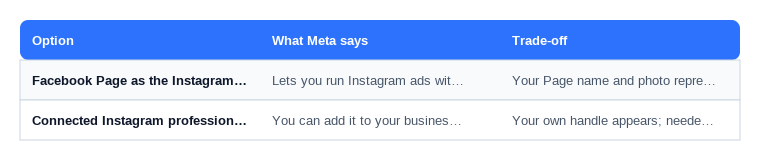
Page identity or connected Instagram account: which is better?
| Option | What Meta says | Trade-off |
|---|---|---|
| Facebook Page as the Instagram identity | Lets you run Instagram ads without an Instagram account | Your Page name and photo represent the ad |
| Connected Instagram professional account | You can add it to your business portfolio or through Page settings | Your own handle appears; needed for some tools in the Instagram app |
Meta’s Instagram requirements page recommends connecting your business Facebook Page to Instagram to get the most out of business tools, and says a professional account unlocks running ads from your professional account and a dashboard of insights. If your store is building a brand on Instagram, connect an account; if you only want reach for a campaign, the Page route is faster.
What else decides whether Instagram ads run?
Meta recommends choosing “Include all available placements” in Ads Manager so ads run across Instagram and other Meta platforms for the best value, and says delivery works best with more people to choose from. If you select only Instagram under Platforms, ads appear only there. How the placements perform for a store is in Instagram ad placements for e-commerce, and the platform comparison is in Instagram Ads vs Facebook Ads for e-commerce.
Which ways can I advertise on Instagram?
Meta’s page on advertising on Instagram lists boosting from the Instagram app, boosting at instagram.com, creating from your Facebook Page, using Meta Business Suite and using Ads Manager. It says the most advanced Advantage+ features and automation are in Ads Manager, and that boosting from the app sets audience and placement options automatically. On iOS Meta notes an Apple service fee of 30% may apply when adding funds in the Instagram iOS app and suggests instagram.com to avoid it.
What should I check before I pay?
Three checks save a rejected or misrouted campaign. First, the Instagram ad preview must appear, as Meta says that confirms eligibility. Second, read the identity shown in the preview, because a store brand that appears under a different Page name looks untrustworthy to buyers. Third, confirm that your landing page and policies match the ad, since Instagram ads are reviewed like Facebook ads. Meta notes that special ad category and pharmaceuticals campaigns may not have access to every Advantage+ feature or may see a different experience, so those advertisers should expect slightly different steps.
Bach.ai is our product. Its audit reads Meta Ads accounts including placement and audience setup, and ranks findings by estimated recoverable spend. On a paid plan a supported change is applied on Meta or Google Ads only after you approve it by default (Auto-Pilot is opt-in); the free trial does not apply changes, and recoverable-spend figures are estimates, not guarantees. For a hands-on review, use the Meta Ads audit checklist.
FAQ
Do I need a Business Manager or business portfolio?
Meta’s page says you can add an Instagram account to your business portfolio or connect it through your Page settings. The Page-identity route above does not require a separate Instagram account.
Will my Page name show on Instagram?
Meta says the connected Page is selected to be the voice of your ads on Instagram. Check the Instagram ad preview to see exactly what shows.
Can I add an Instagram account later?
Yes. Click Connect account under Instagram account in the ad’s Identity section.
Why is my Instagram preview missing?
Meta says to check that your objective supports Instagram and that Instagram is included in your placements.
Sources, read on 25 November 2026: How to run ads on Instagram with your Facebook Page; How to create Instagram ads in Meta Ads Manager; About advertising on Instagram; Ways to advertise on Instagram.