What Can I Control in Google Performance Max?
What can I control in Google Performance Max?
You can set the conversion goal and budget, add audience signals and search themes, apply brand exclusions and negative keywords, set channel priority tiers, and switch Final URL expansion and text customization on or off. Exact match Search keywords win over Performance Max, and you must review generated assets.
Performance Max is sold as a single campaign for all of Google, which makes buyers worry that they have no say. Google lists several controls. Knowing them turns a black box into a tool you can steer, with limits.
What is Performance Max?
Google describes Performance Max as a goal-based campaign type that lets you reach all Google Ads inventory, including YouTube, Display, Search, Discover, Gmail and Maps, from a single campaign, to complement keyword-based Search campaigns (About Performance Max campaigns). The assets and settings you provide, such as images, data feeds and bidding goals, combine with Google AI to serve across all available inventory and optimise for your goals. You can create it with a Sales, Leads, Website traffic or Local store visits objective, or without a goal’s guidance.
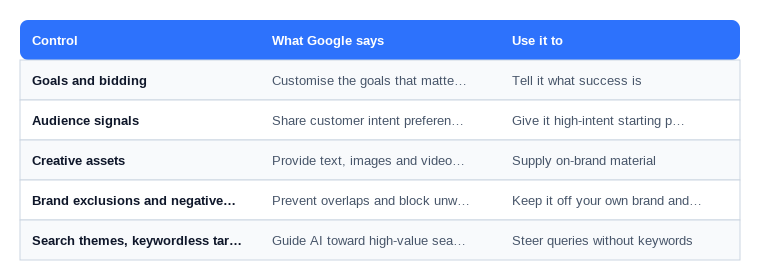
What can I steer?
| Control | What Google says | Use it to |
|---|---|---|
| Goals and bidding | Customise the goals that matter, conversions or conversion value | Tell it what success is |
| Audience signals | Share customer intent preferences to guide learning | Give it high-intent starting points |
| Creative assets | Provide text, images and videos; turn on text customization and brand guidelines | Supply on-brand material |
| Brand exclusions and negative keywords | Prevent overlaps and block unwanted queries | Keep it off your own brand and junk |
| Search themes, keywordless targeting | Guide AI toward high-value search intent | Steer queries without keywords |
| Channel prioritization | Priority tiers across inventory; Google surfaces grouped as Google channels; Search partners and Display set separately with optional daily budget allocation | Guide where budget goes |
| Final URL expansion | Match queries to relevant landing pages and auto-generate dynamic assets | Allow or disallow page matching |
| Safety and budget | Daily spend targets, brand safety settings, placement exclusions, content suitability filters | Set the limits |
Google notes you remain responsible for reviewing and ensuring compliance and accuracy of landing page content and all dynamically generated assets.
How does it interact with Search campaigns?
Google states that Search campaigns containing an exact match keyword are prioritised to serve over Performance Max when a query hits an exact match keyword, and that search themes carry the same priority as phrase and broad match keywords. So your best exact match terms keep their own campaign’s control. For the trade-off between the two see Should an ecommerce store use Performance Max or Search campaigns?.
What should I check weekly?
- The asset report: remove text or images that do not fit the brand. Where text customization is on, use text guidelines; see Can I control the text Google AI writes for ads?.
- Search terms and negative keywords; How do I read Google Ads search terms and add negatives? shows the routine.
- The landing pages Final URL expansion uses.
- Cost per conversion and value against your own order data.
- Brand exclusions, so the campaign is not simply harvesting your own brand searches.
- Budget against the recommendation Google shows.
How do I set it up so the controls actually help?
Start with the goal. If you track purchase value correctly, optimise for conversion value, not for conversions, so the system can tell a $200 order from a $20 one. Add audience signals from your own data, such as customers and high-intent visitors, as starting hints rather than limits; Google describes signals as guidance that accelerates learning, not hard targeting. Add brand exclusions so your own brand searches stay in Search where you can see and control them. Add negative keywords for terms you know are wrong, such as “free”, “jobs” or “repair” if you do not offer them.
Then decide on Final URL expansion. If your site has pages you do not want sent traffic, such as a returns policy, test with it off first, or exclude those URLs. Set a daily spend target you can afford to lose for four weeks, since a learning period costs money, and write the date and the settings down. Resist editing for the first two weeks. Judge on cost per conversion and conversion value against your store’s orders, and review the asset report weekly for anything off brand. If a setting is not documented in your account as editable, do not assume you can change it; check the interface.
When is Performance Max a poor fit?
When you have too few conversions to learn from, when you need strict control of where ads show, when your tracking is unreliable, or when you cannot review generated assets. Google says it is recommended when you have specific conversion goals, want to maximise performance without restricting where ads appear, want all channels from a single campaign, and want reach beyond keyword-based Search. If none of those describes you, start with Search. Compare any test against the Meta ads audit checklist approach: baseline first, one change at a time.
Can software help?
Bach.ai audits connected Google Ads accounts and ranks findings by estimated recoverable spend, and on a paid plan applies supported changes only after your approval by default. It does not see inside Performance Max’s channel allocation beyond what Google reports, and it does not claim to.
FAQ
Can I stop Performance Max showing on my brand terms?
Google lists brand exclusions and negative keywords as controls to prevent overlaps and block unwanted queries.
Does it beat my Search campaign?
Not by default. Google says exact match keywords in Search campaigns are prioritised over Performance Max for matching queries.
Can I choose where it shows?
You can guide it with channel priority tiers and exclusions, but it is designed to serve across inventory, so you cannot pick one placement.
Are generated assets my responsibility?
Yes. Google says you remain responsible for reviewing compliance and accuracy.
Sources: Google Ads Help, About Performance Max campaigns, Use text guidelines with Performance Max and Search campaigns (beta), About Final URL expansion in Search (checked 25 Nov 2026); Bach.ai capabilities from our features page.