Can Google AI Translate My Search Campaigns?
Can Google AI translate my Search campaigns?
Yes, in beta. Google's localization tool builds a new independent Search campaign in a supported language, translating text, images and landing pages. It copies budgets and bids exactly with no currency conversion, and publishes paused by default, so review the translations, set the budget in the right currency and check the landing page.
Taking a Search campaign into a new market normally means a translator, a spreadsheet and a week of waiting. Google now offers an AI tool for it. It saves real time, and it has two traps that cost real money if you miss them.
What does the localization tool do?
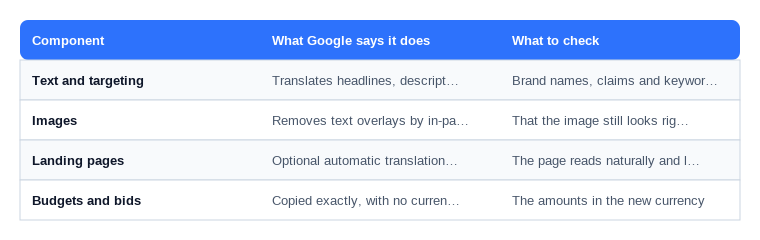
Google says you can use the AI campaign localization tool to quickly localise entire Search campaigns for new languages and regions with generative AI, translating text, images, targeting and landing pages in a few clicks (About the AI campaign localization tool). It creates a brand new, independent campaign and never modifies the original. It handles:
| Component | What Google says it does | What to check |
|---|---|---|
| Text and targeting | Translates headlines, descriptions, sitelinks, callouts and keywords | Brand names, claims and keyword intent |
| Images | Removes text overlays by in-painting and adds translated text as supplemental assets | That the image still looks right |
| Landing pages | Optional automatic translation by a code snippet, or bulk URL update | The page reads naturally and links work |
| Budgets and bids | Copied exactly, with no currency conversion | The amounts in the new currency |
What is the budget trap?
Google states that budgets and bids are copied exactly, and that the system does not perform currency conversions or exchange rate calculations: a $100 USD budget becomes a $100 USD budget in the localised campaign. If your new market bills in euros, a copied “100” is 100 euros, which is a different number in real terms. Check the budget and every bid after you create the campaign, and set them from your target cost per acquisition in the new currency, not from the original’s numbers. This is the single most important check.
What are the steps?
- In the Campaigns table, tick an eligible campaign and choose the localization option, or use Translation under Tools, or apply a localization recommendation in optimization score.
- Choose your goal and target language, and set the new location and budget.
- Optionally add global instructions, such as “Do not translate the brand name” or “Keep the tone formal”.
- Click Translate, then review the table: original asset, translated asset, a translation back into English so you can check meaning, and translation notes. You can edit any text inline.
- Choose a landing page strategy: AI translation through a snippet you install once per account, a bulk domain update such as example.com/en to example.com/fr, or no URL change.
- Publish. Google says the default is a Paused campaign so you can do final reviews.
What languages and limits apply?
Google says the tool supports Search campaigns with English (US) as the source language, and lists target languages including Dutch, French, French (Canada), German, Italian, Polish, Portuguese (Brazil), Portuguese (Portugal), Spanish (Spain) and Spanish (Latin America and Caribbean). It says more target languages will follow by the end of 2026 and that Performance Max support begins in September 2026. The original campaign must be active or paused, and removed, draft, experimental or shadow campaigns are not supported.
What should I review before I switch it on?
You do not need to speak the language to review the table, because of the translation back, but you still need a native read for anything that makes a claim. Ask a native speaker to check headlines, offers and legal wording. Check that shipping, returns and prices on the landing page match the market. Check the policy rules for the country; a phrase that is fine in one market may not be in another. Where the product is regulated, have a person approve every line. For AI-made assets and labels see Do I have to label Google Ads assets made with AI?, and for adapting a winner to a new market on Meta see How do I adapt a winning ad for a new market?.
How do I judge whether it worked?
Give the localised campaign its own baseline and a fair test period. Compare cost per conversion with your target for that market, not with the home campaign. Watch the search terms report for mistranslated keywords; How do I read Google Ads search terms and add negatives? shows the routine. Use the Meta ads audit checklist approach to record a dated baseline before you scale.
Can software help?
Bach.ai audits connected Google Ads accounts and ranks findings by estimated recoverable spend in your own currency, which makes the budget trap above easier to spot. It does not translate campaigns; that stays in Google Ads, and changes it proposes wait for your approval by default on a paid plan.
FAQ
Does the tool change my original campaign?
No. Google says it creates a new independent campaign and the original is never modified.
Is the budget converted into the new currency?
No. Google says budgets and bids are copied exactly, with no currency conversion.
Does it go live automatically?
Google says the default option is to publish in a Paused state so you can review first.
Which source language works?
Google says the tool translates campaigns with English (US) as the original source language.
Sources: Google Ads Help, About the AI campaign localization tool for Search campaigns (beta), About generated images in Google Ads, Use text guidelines with Performance Max and Search campaigns (checked 25 Nov 2026); Bach.ai capabilities from our features page.