Advantage+ Audience Controls vs Suggestions
What do Advantage+ audience controls and suggestions do?
Controls limit who can see your ads and are respected: locations, minimum age, languages and excluded custom audiences. Suggestions are hints: Meta shows ads to people matching them plus others likely to respond, so a Women suggestion can still reach men. To make age, gender or detailed targeting a hard limit, use Further limit your audience.
Most confusion about Advantage+ audience comes from one assumption: that every field in the audience section works the same way. It does not. Some fields fence the audience in; others only point Meta’s delivery system in a direction. Knowing which is which tells you what to enter, and what will not hold.
What is the difference between controls and suggestions?
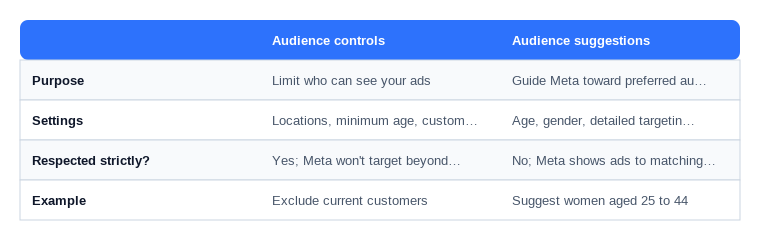
Meta’s explanation of controls and suggestions, checked 24 Nov 2026:
| Audience controls | Audience suggestions | |
|---|---|---|
| Purpose | Limit who can see your ads | Guide Meta toward preferred audiences |
| Settings | Locations, minimum age, custom audiences to exclude, languages | Age, gender, detailed targeting, custom audiences to include |
| Respected strictly? | Yes; Meta won’t target beyond your locations unless you select Reach more people likely to respond to your ads | No; Meta shows ads to matching people and to others when it is likely to improve performance |
| Example | Exclude current customers | Suggest women aged 25 to 44 |
Meta gives its own example: if you suggest the gender Women, your ads could also reach men if Meta’s AI finds them likely to respond. Suggestions never override controls: they are not shown outside your audience controls.
How do I set audience controls?
From Meta’s Advantage+ audience setup:
- In Ads Manager, click + Create, choose an objective and go to the ad set.
- Find the Audience section and use Controls; hover over Locations and click Edit.
- Keep locations as broad as the business allows. Meta recommends targeting as broadly as possible.
- Click Show more controls and choose Exclude these custom audiences, for example your current customers.
- Set a Minimum age if your product cannot legally be sold to younger people, and add Languages if needed.
- Click Publish when the ad is ready.
Two limits to know: Meta says you cannot select ages under 18 with Advantage+ audience, and you cannot exclude lookalike audiences, because an exclusion constrains the audience and reduces delivery opportunities.
How do I add suggestions without limiting delivery?
- In the same ad set, find Suggest an audience and click Show settings.
- Under Include these custom audiences, add customer lists, site visitors or lookalikes you trust.
- Add Age, Gender or Detailed targeting only if you believe in them as a starting point.
- Leave the Use as a suggestion box ticked.
If you set a Minimum age in controls, Meta says your setting cannot be overruled by a suggestion. A good suggestion is evidence you have, such as your repeat-purchase audience; a weak one is a guess about interests. See Should I use Advantage+ audience or interest targeting? for when to lean on each.
How do I turn a suggestion into a hard limit?
Meta’s answer: if reaching a specific audience matters more than performance, select Further limit your audience (or Further limit the reach of your ads) and set Age, Gender, Custom audience inclusions or Detailed targeting as controls, unchecking Use as a suggestion where it appears. Meta also lists this as the way to turn Advantage+ audience off, so you give up the system’s freedom to find people outside your selections.
What results does Meta claim for Advantage+ audience?
Meta reports that Advantage+ audience campaigns achieved 14.8% lower cost per result for Awareness, 9.7% lower for Traffic, Engagement and Leads, and 7.2% lower for Sales and App promotion (About Advantage+ audience). These are Meta’s numbers from its own data, not a guarantee for your account. Meta recommends A/B testing with Advantage+ audience for almost all campaign types, and says it is not recommended for retargeting campaigns.
So test it the way Meta suggests: duplicate the ad set, keep one on Advantage+ audience and one on a narrower setup, and compare cost per purchase once both leave learning. How to read that comparison is in Should I use broad or narrow targeting on Meta?
When are controls and suggestions not available?
Meta notes that Special Ad Category campaigns for financial products and services, employment or housing, and for social issues, elections and politics do not have access to Advantage+ audience. If your ads run in those categories, plan on the original audience options.
Can software help?
Bach.ai can review an ad set’s audience setup, including audience saturation and learning health, in its audit; it applies a supported Meta change, by default, only after you approve it (Auto-Pilot is opt-in) on an active paid plan. It does not decide your controls for you. The checks that matter are in the Meta ads audit checklist.
FAQ
Does Advantage+ audience ignore my targeting?
Not all of it. It follows controls such as location, minimum age, language and excluded custom audiences. It treats age, gender, detailed targeting and included audiences as suggestions it may go beyond. Use Further limit your audience if you need those treated as limits.
Can I exclude customers with Advantage+ audience?
Yes. Under Controls, click Show more controls and choose Exclude these custom audiences. Meta says excluded custom audiences can still be added as suggestions, and you cannot exclude lookalike audiences with Advantage+ audience. Step-by-step setup is in How do I exclude existing customers from Meta ads?
Should I add a lookalike as a suggestion?
It is a reasonable start when your seed is good: Meta treats the lookalike as guidance and may deliver beyond it, so the lookalike does not cap who sees the ad. See Does Advantage+ lookalike ignore my lookalike percentage?
Where do I stop certain audiences ever seeing ads?
Use account controls. Meta says Ad account settings let you limit where ads are shown for some settings, which is where audiences that should never see ads from your account belong.
Sources: Meta Business Help Center, About Audience controls and Audience suggestions in Advantage+ audience, How to create a campaign using Advantage+ audience, About Advantage+ audience (all checked 24 Nov 2026).