What Aspect Ratio Should Instagram Ads Be?
What aspect ratio should Instagram ads be?
Meta recommends 1:1 for single-image ads in Instagram Feed and 9:16 for Stories and Reels, with 4:5 also supported in Feed. Ads Manager can crop media automatically to fit placements, so upload each ratio you care about and review the auto-generated crops before publishing.
Instagram ads fail quietly when the picture is the wrong shape: the product gets cropped, the text drops outside the safe area, or Ads Manager reframes it without asking. Meta’s help center gives a recommended ratio per placement. This post reads those pages, fetched on 25 November 2026, and turns them into a short upload plan for a store. Specs change, so confirm on the linked pages before you export a batch.
Which aspect ratio does Meta recommend for each Instagram placement?
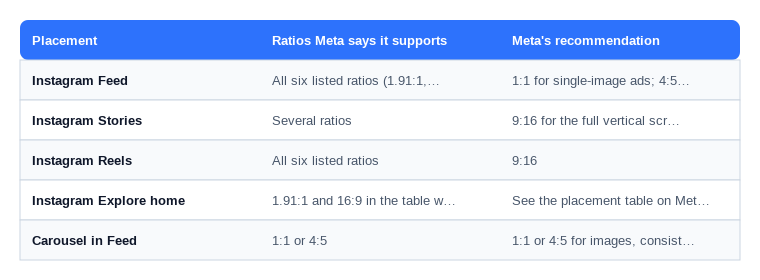
| Placement | Ratios Meta says it supports | Meta’s recommendation |
|---|---|---|
| Instagram Feed | All six listed ratios (1.91:1, 16:9, 1:1, 4:5, 2:3, 9:16) | 1:1 for single-image ads; 4:5 is also supported for images and videos |
| Instagram Stories | Several ratios | 9:16 for the full vertical screen |
| Instagram Reels | All six listed ratios | 9:16 |
| Instagram Explore home | 1.91:1 and 16:9 in the table we read | See the placement table on Meta’s page |
| Carousel in Feed | 1:1 or 4:5 | 1:1 or 4:5 for images, consistent across cards |
Two lines from Meta’s best-practice page carry most of the weight. For Feed placements, both 1:1 and 4:5 are supported for images and videos, and “1:1 is recommended for single-image ads to be delivered to Instagram Feed”. For Stories, Status and Reels, most people hold phones vertically, so 9:16 is recommended to capture the whole screen. If a number in your Ads Manager disagrees, trust Ads Manager, because Meta updates the tables.
How does Ads Manager treat an image in the wrong ratio?
Meta says that when you create an ad in Ads Manager your media is automatically adjusted to fit more placements. If you want precise control, upload assets in specific aspect ratios. Its example: if Stories matters for the campaign, upload a 9:16 asset or create one from an existing asset. It also tells you to review auto-generated crops before publishing so important content is not cut off, and to read the safe zone guidance for Facebook and Instagram.
One more rule that stores miss: Meta says that cropping alone will not restrict delivery. If a specific asset should run only in certain placements, use placement opt-outs as well as cropping.
What are the carousel limits on Instagram?
Meta’s carousel page lists, for Instagram, a minimum of 2 cards and a maximum of 3 in Stories and 10 in Feed. It gives aspect ratios of 1:1 or 4:5 for Feed and 9:16 for Stories, recommended resolutions of 1080 x 1080 pixels for Feed and 1080 x 1920 for Stories, and a maximum file size of 4 GB for video and 30 MB for images. Instagram carousel text is limited to 125 characters, with up to 30 hashtags. A full carousel guide is in How many cards can an Instagram carousel ad have?.
How do I prepare a set of Instagram creatives?
- Export your hero image at 1:1 for Feed.
- Export a 9:16 version for Stories and Reels, keeping text and the product inside the safe zone.
- Open Ads Manager, upload both, and open the aspect ratios view to preview each variation.
- Check the auto-generated crops for any placement you did not cover and fix cut-off text.
- Use placement opt-outs for a placement where an asset looks wrong, since cropping alone will not stop delivery.
- Review the ad in each placement’s preview before you publish.
Reel-specific specs and test ideas are in Instagram Reels ad specs and what to test, and the wider placement question is in Advantage+ placements vs manual placements.
Should I make separate creative for Feed and Stories?
For a store with enough budget, yes: a vertical video made for Stories usually needs a different frame from a square product photo. For a small budget, one vertical asset plus one square asset covers most placements without splitting spend across too many ad sets. Our view on that trade-off is in Should I run fewer ad sets on a small budget?. Which placement earns orders is a data question: see Instagram ad placements for e-commerce.
Bach.ai is our product. Its audit reviews creative fatigue and can draft the next angle to test, but it does not design or resize your images. On a paid plan a supported change is applied on Meta or Google Ads only after you approve it by default (Auto-Pilot is opt-in); the free trial does not apply changes, and recoverable-spend figures are estimates, not guarantees. For a hands-on review, use the Meta Ads audit checklist.
FAQ
What size is a square Instagram ad?
Meta’s carousel page recommends 1080 x 1080 pixels for Instagram Feed. For other formats, check the current specification page, because minimum sizes differ by format.
Can I use one video for Feed and Stories?
You can, but Meta recommends 9:16 for Stories and notes that Ads Manager will adjust media for other placements. A 9:16 video may be cropped in Feed, so preview each placement.
Why was my image cropped in Reels?
Meta says Ads Manager adjusts media automatically to fit placements. Upload a 9:16 asset for Reels and review the auto-generated crops before publishing.
Do hashtags matter in Instagram ad copy?
Meta’s carousel page says Instagram carousel copy allows up to 30 hashtags. It does not say they improve results.
Sources, read on 25 November 2026: Best practices for aspect ratios in Meta ads; Aspect ratios supported by placements in Meta Ads Manager; Design specifications for carousel ads.