Do I Need a Video in Performance Max?
Do I need a video in Performance Max?
Not strictly: Google says that if you provide no video, Google AI can generate one from your images, text and product feed when eligible. Its guidance is still to add at least one video per orientation, each 10 seconds or longer, including a vertical 10-60 second video for Shorts eligibility.
Many stores launch Performance Max with images and text only and ask whether a video is worth making. Google’s pages answer in two parts: a video is not required because Google can generate one, and Google still recommends your own. This guide reads Google’s pages on video assets, auto-generated video ads and Performance Max questions, fetched on 25 November 2026. Specs change, so check the requirements page for your account.
What are the options for video?
Google’s overview of Performance Max questions says there are three ways to include video: upload your own, which Google AI can trim, flip and resize behind the scenes; use the video creation tool in the campaign flow, with templates, text, music and voiceovers; or auto-generate, where, if you provide no video, Google AI turns your existing images, text and product listings from your Merchant Center feed into videos.
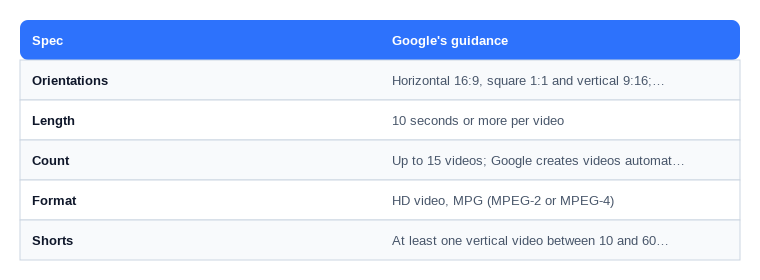
What are the specs for my own video?
| Spec | Google’s guidance |
|---|---|
| Orientations | Horizontal 16:9, square 1:1 and vertical 9:16; one of each recommended |
| Length | 10 seconds or more per video |
| Count | Up to 15 videos; Google creates videos automatically when possible if you have none |
| Format | HD video, MPG (MPEG-2 or MPEG-4) |
| Shorts | At least one vertical video between 10 and 60 seconds |
| Audio-only files | MP3, WAV or PCM are not accepted |
Google adds that it automatically resizes video ads to increase performance by platform.
How does auto-generated video work?
Google says that when eligible, Google AI automatically generates additional video ads in multiple orientations using the text and image assets in your asset groups, brand guidelines such as colour and font, and Merchant Center feed product images for Performance Max with a feed. It chooses a video template, colours, font and music that match your brand. The page describes it as a way to generate video without production cost. The trade-off is control: you do not see the result before it serves unless you check the generated assets, so review them in your asset reports and make sure the products shown match your landing page and stock.
Does video really lift conversions?
Google’s Performance Max questions page says advertisers with at least one video in their campaigns saw an average 12% uplift in conversions. That is Google’s own figure from its own data and we have not verified it, so treat it as a reason to test, not a promise. For a store the honest test is simple: run one asset group with your own video and one without, same products and budget split, for at least a few weeks, and compare store revenue and margin rather than platform conversions. Google also recommends waiting two to three weeks before replacing low-performing assets, as covered in How should I structure Performance Max asset groups?.
How do I make a video cheaply?
- Start with your best-selling product and a 10 to 15 second clip showing it in use.
- Cut a 9:16 vertical version first, since Shorts eligibility needs one between 10 and 60 seconds.
- Export 1:1 and 16:9 versions with captions burned in, as many viewers watch without sound.
- Name the files clearly and upload one of each orientation to the asset group.
- Check Ad Strength, then leave the group alone for a few weeks.
If you reuse your Meta creative, look at What are the Instagram Stories ad specs? and Instagram Reels ad specs and what to test, since the vertical masters are shared. The broader comparison with Search is in Performance Max vs Search campaigns for e-commerce.
What should I check before the video goes live?
Check four things. The first frames should show the product, because Performance Max places video on YouTube and other video inventory where attention is short. Captions should carry the message without sound. The offer in the video must match the landing page and current stock, since Google notes that Performance Max with auto-generated videos may show visitors a different product than the one in the video when the Final URL does not match the video’s product. And the video should not make claims you cannot support. Keep a record of which video ran in which asset group and for how long, so a later change in results can be traced to the creative and not to guesses.
Bach.ai is our product. Its audit flags creative fatigue and can draft the next angle to test; it does not produce your video. On a paid plan a supported change is applied on Meta or Google Ads only after you approve it by default (Auto-Pilot is opt-in); the free trial does not apply changes, and recoverable-spend figures are estimates, not guarantees. For a hands-on review, use the Meta Ads audit checklist.
FAQ
Is video required?
Google’s requirements table marks video as not required, and says Google creates videos automatically when possible if you have none.
How long must a video be?
Google’s guidance is 10 seconds or more, with at least one vertical video between 10 and 60 seconds for Shorts eligibility.
Can I use audio-only files?
No. Google says MP3, WAV or PCM files are not accepted.
Is the 12% uplift guaranteed?
No. It is a Google-reported average from its own data, so test it on your own account.
Sources, read on 25 November 2026: About video assets for Performance Max campaigns; About auto-generated video ads; Answering your top questions about Performance Max; Best practices for asset groups in Performance Max campaigns.