What Permission Do I Need to Run a Creator Post?
What permission do I need to run a creator post?
You need the creator's permission: content-level for one post, or account-level for ongoing work. Creators can revoke either at any time. The post must tag your brand, for example with the paid partnership label, and a boosted collab post becomes a partnership ad. Meta's disclosure rules require creators to tag business partners when value is exchanged.
Creator content often outperforms brand-made content, and the temptation is to download a post and run it from your own account. The platform’s route is a partnership ad with permission. This guide covers the permissions, the label and what each side controls.
What is a partnership ad?
Meta describes partnership ads as ads run with partners, including creators, brands and other businesses, where the partner account, the advertiser account or both appear in the ad’s header and the ads use signals from both accounts (About partnership ads). Branded content ads are now called partnership ads. Meta says that to run them, advertisers need permission from the partner whose handle the ad will include, and creators and partners can revoke permissions at any time (About partnership ad permissions). There is one exception: if two accounts are owned by the same business and an employee has ads access to both, they can run partnership ads without permissions.
Which permission do I need?
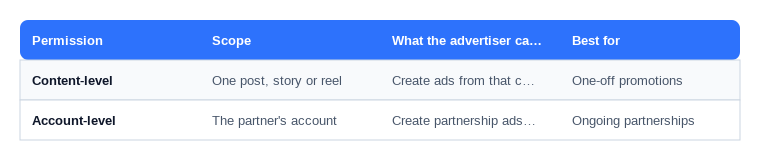
| Permission | Scope | What the advertiser can do | Best for |
|---|---|---|---|
| Content-level | One post, story or reel | Create ads from that content when the creator allows brand partner boost and you are tagged in the paid partnership label | One-off promotions |
| Account-level | The partner’s account | Create partnership ads without pre-existing content; create ads from existing content that tags you (paid partnership label, @mention, people tag, product tag or collab) | Ongoing partnerships |
Meta says content-level permissions are more restrictive; account-level are broader and suited to ongoing partnerships, and requests can be accepted in Partnership Ads Hub, the Instagram app or the Facebook app. With either, advertisers can hide comments on ads they run and edit content for ads while the original post stays the same, and creators can unhide comments or hide or delete comments on ads or the original post. All insights on partnered content can be seen.
Do I need a paid partnership label?
Meta’s branded content page says its policies require anyone on a professional or personal account to tag business partners in branded content when there is an exchange of value, and branded content includes posts where products were gifted for free (About branded content). The label itself reads “Paid partnership with” followed by the partner’s name; if the post is boosted or is an unpublished ad, an Ad label appears as with any ad, and content with an affiliate link should have the label even without a tagged partner (About labels on paid partnership posts). Your creator contract should say who adds the label and when.
What should the creator agreement cover?
- Which posts you may run, and for how long.
- Whether permission is content-level or account-level.
- Who adds the paid partnership label and checks it.
- Who may hide or reply to comments, and the escalation if a comment is a complaint.
- Edits allowed to the creative; Meta says advertiser edits for ads leave the original post unchanged.
- What happens if the creator revokes permission: your ads stop.
- Usage rights and payment terms, set in your own contract, not by Meta’s tools.
How do I run it?
Follow the setup in How do I set up an Instagram partnership ad with a creator?, and decide whose handle fronts the ad using Should I run creator content from my brand page or theirs?. Before you spend, confirm the permission is active in the Partnership Ads Hub and that the post tags your brand. After launch, check comments daily, since the creator’s audience may react differently from yours; How do I hide or manage comments on my Facebook ads? covers the tools. For an overall review use the Meta ads audit checklist.
How do I choose between content-level and account-level?
Choose content-level when you want to test one post. It is the safer ask: the creator keeps control, and you spend before committing to anything larger. The cost is friction, because each post needs its own permission. Choose account-level when the partnership is ongoing, you plan several flights and you want to build ads from the creator’s handle without waiting for a new post each time. Meta says account-level lets you create partnership ads, other ad types and marketing messages from a partner’s handle without pre-existing content, and include or exclude the partner’s custom audiences.
For a first partnership, start content-level, measure cost per purchase against your own creative, and request account-level permission only if the results justify the broader access. Document the choice in the creator agreement so both sides know what happens when the permission is revoked or the contract ends. Keep a register: creator, handle, permission type, date granted, date revoked and the ads running under it, so you can switch them off quickly if the creator withdraws.
What are the risks?
A revoked permission stops delivery, so keep a second creative ready. A creator who forgets the label creates a disclosure problem for both of you. Claims in the creator’s words are still your ad; check them against policy. And never download and re-upload a creator’s video without permission, which skips the label and the permission model.
Can software help?
Bach.ai tracks creative fatigue and ranks audit findings by estimated recoverable spend on connected accounts; it does not manage creator permissions, which live in Meta’s Partnership Ads Hub and apps.
FAQ
Can a creator revoke my permission?
Yes. Meta says creators and partners can revoke permissions at any time.
Can I edit the creator’s post?
You can edit your content for ads, and Meta says the original post stays the same.
Does an affiliate link need the label?
Meta says content featuring an affiliate link should have the paid partnership label, though no business partner needs to be tagged.
Does a free gift count?
Meta’s branded content definition includes products and services gifted for free.
Sources: Meta Business Help Center, About partnership ad permissions, About partnership ads, About branded content on Facebook, Instagram and Threads, About labels on paid partnership posts (checked 25 Nov 2026); Bach.ai capabilities from our features page.