How to Set Up Instagram Partnership Ads (2026)
How do I set up an Instagram partnership ad with a creator?
Get the creator's permission first: account-level permission through a request, or content-level permission through an ad code. Then, in Ads Manager, create the ad, turn on the Partnership ad toggle, paste the ad code or post URL, pick the header identities and publish. Creators are paid off the platform.
Partnership ads, which Meta used to call branded content ads, let you run a creator’s post as an ad with the creator’s handle, your handle or both in the header. The setup has two parts that people mix up: the permission you need from the creator, and the toggle you flip in Ads Manager. This guide covers both, who pays whom, and how to tell whether the format pays off for you.
What is an Instagram partnership ad?
Meta says partnership ads let businesses run ads with partners, including creators, brands and other businesses; the partner account, the advertiser account or both appear in the header, and the ads use signals from both accounts to help improve performance (About partnership ads). That performance line is Meta’s description, not a result you should assume.
A partnership ad is different from organic branded content. Branded content is organic content a creator posts after being compensated by a brand, carrying the Paid partnership label; Meta says partnership ads need separate permissions from the label (About branded content).
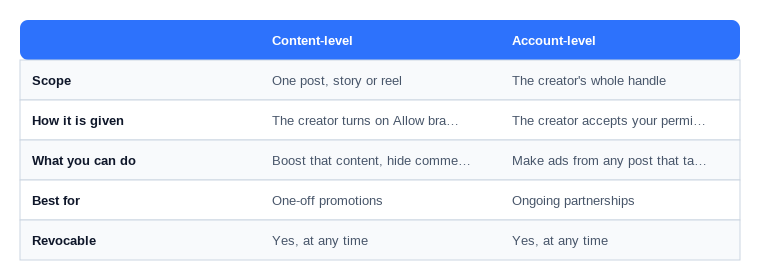
Which permission do I need from the creator?
Meta’s permissions article defines two types:
| Content-level | Account-level | |
|---|---|---|
| Scope | One post, story or reel | The creator’s whole handle |
| How it is given | The creator turns on Allow brand partner to boost, or shares an ad code | The creator accepts your permission request, in the Partnership Ads Hub, Instagram or Facebook |
| What you can do | Boost that content, hide comments on your ad | Make ads from any post that tags you, or create ads without pre-existing content |
| Best for | One-off promotions | Ongoing partnerships |
| Revocable | Yes, at any time | Yes, at any time |
Meta adds that if two accounts belong to the same business and an employee has ads access to both, they can run partnership ads without partnership permissions. Creators can unhide comments you hide on the ad, and can hide or delete comments themselves.
How do I create the partnership ad in Ads Manager?
Meta’s how to create a partnership ad gives these steps for an ad code:
- Go to Ads Manager, click + Create and select your objective.
- Complete conversion location, budget, schedule and audience, then click Next.
- At the ad level, turn on the Partnership ad toggle.
- Click Enter ad code or post info and paste the ad code, post ID or post URL.
- Select the second identity to show in the header: both identities, the first identity only, or dynamic identity, which Meta turns on by default and uses to pick what is predicted to perform best.
- Click Done, finish the ad and click Publish.
With account-level permission and no code, turn on the toggle, open Identities and Edit, then choose Use existing post and Select post, or Create ad to upload new creative. Meta also notes that boosting an existing collab post in Ads Manager automatically makes it a partnership ad.
What must be true before the ad will run?
Check Meta’s eligibility requirements first: partnership ads run on public content from Instagram professional accounts and Facebook Pages or profiles in professional mode, content must follow Community Standards, and creators need an established presence. Meta also recommends linking the Instagram and Facebook accounts, and says content must be in an eligible format.
If an agency runs the ads for you, Meta says you must grant the agency permissions across your Instagram account, Facebook Page and ad account. How do I manage many client ad accounts safely? covers that access.
Who pays the creator, and what do I need in the contract?
Meta states that creators whose content is used in partnership ads are paid off the platform, and that it does not support payments through the Instagram app or on Facebook. So the fee, term and usage rights live in your own agreement; start with What usage rights do I need in a UGC creator contract? and brief the creator with How do I write a creator brief that produces winning ads?
When do partnership ads pay off?
Meta publishes no figure for how much better partnership ads perform, so decide by your own test:
- Run the creator’s post as a partnership ad and, in a duplicate ad set, as a normal ad from your brand handle with the same audience and budget.
- Compare cost per purchase after both clear the learning phase.
- Use the Creator partner breakdown in Ads Reporting to split partnership results by creator; Meta says it cannot be combined with other breakdowns and supports a limited set of metrics, including impressions, reach and link clicks.
If the creator version wins on purchases, keep the account-level permission and brief more content. If it only wins on clicks, the creative is entertaining but not selling. The strategic side, handle versus brand page, is in Should I run creator content from my brand page or theirs?
Can software help?
Bach.ai does not handle creator permissions or contracts; those stay in Meta’s tools and your agreement. Once the ad is live, its audit ranks what it finds in your Meta account by estimated recoverable spend, and it applies a supported change, by default, only after you approve it (Auto-Pilot is opt-in) on an active paid plan. To compare what other tools do and do not cover, see the best Meta ads tools.
FAQ
Do I need the creator’s login?
No. The creator gives permission instead, either account-level through a request they accept, or content-level by sharing an ad code. They can revoke it at any time, which ends your permission.
What is a partnership ad code?
A code the creator generates for a specific post, story or reel that lets you boost that content as a partnership ad, even if you are not tagged in it. Meta calls this content-level permission, and you paste the code at the ad level.
Can I run partnership ads on WhatsApp Status?
Meta says that from September 2026 you can create partnership ads in the WhatsApp Status placement, with both identities always shown in the header. Availability can vary by account, so check the placement in your own Ads Manager.
Is a partnership ad the same as a Paid partnership label?
No. The label discloses a commercial relationship on the creator’s organic post. A partnership ad is a paid ad in Ads Manager that carries an Ad label and needs separate permission from the creator.
Sources: Meta Business Help Center, About partnership ads, How to create a partnership ad, About partnership ad permissions, Eligibility requirements for partnership ads, About branded content, About labels on paid partnership posts, About breakdowns, metrics and filtering in Ads Reporting (all checked 24 Nov 2026).