Can I Advertise on WhatsApp Status and Messenger?
Can I advertise on WhatsApp Status and Messenger Stories?
Yes. Meta lists WhatsApp Status and Messenger Stories among ad placements, available by objective, ad type and region. Adding placements does not raise ad cost. WhatsApp Status image ads have a recommended minimum of 500 by 320 pixels, and Meta says partnership ads in WhatsApp Status start in September 2026.
Most D2C accounts run on Facebook and Instagram. Meta’s placement list is wider, and two entries matter for stores that already talk to customers by message: Messenger Stories and WhatsApp Status. Here is what Meta documents about them, and how to test without guessing.
Which placements does Meta list?
Meta says that depending on the ad objective you choose, your ads can appear on Facebook, Messenger, Instagram, WhatsApp, Threads and Meta Audience Network, that available placements are determined by your ad type and settings, and that not all placements are available for every ad. It adds that multiple placements increase the number of people who can see your ad and can improve ad results, and that adding more placements does not increase the cost of your ad (About ad placements across Meta technologies). Under Stories, Status and Reels it lists Facebook Stories, Instagram Stories, Messenger Stories, Instagram Reels, Facebook Reels and WhatsApp Status, where your ads appear in WhatsApp Status.
What formats work there?
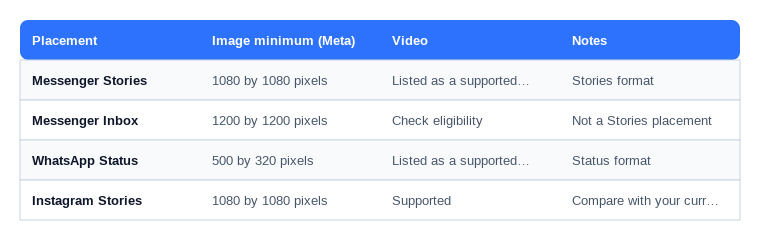
| Placement | Image minimum (Meta) | Video | Notes |
|---|---|---|---|
| Messenger Stories | 1080 by 1080 pixels | Listed as a supported video placement | Stories format |
| Messenger Inbox | 1200 by 1200 pixels | Check eligibility | Not a Stories placement |
| WhatsApp Status | 500 by 320 pixels | Listed as a supported video placement | Status format |
| Instagram Stories | 1080 by 1080 pixels | Supported | Compare with your current ads |
The image figures come from Meta’s recommended minimum pixel requirements, which say to use the highest resolution available and see the Ads Guide for full specifications (Recommended minimum image pixel requirements). Video support is listed in Meta’s supported objectives and placements page, which names Messenger Stories and WhatsApp Status among placements for video ads (Supported objectives and placements for video ads). The same page says single video ads can use Awareness, Traffic, Engagement, App promotion, Leads and Sales objectives.
What about partnership ads in WhatsApp Status?
Meta’s partnership ads page says that starting in September 2026 you can create partnership ads in the WhatsApp Status placement, with the partner, the advertiser or both in the ad header (About partnership ads). If you work with creators, see What permission do I need to run a creator post? for the permission model.
Should I turn these placements on?
Meta recommends Advantage+ placements for the Leads, App promotion and Sales objectives and defaults to them: About Advantage+ placements says those objectives default to Advantage+ placements and remove ad set placement selection, while Awareness, Traffic and Engagement still support manual selection. So for a sales campaign you probably already allow them. The question is whether to look at results by placement. Steps:
- In Ads Manager, view results broken down by placement.
- Look at spend and cost per purchase for Messenger Stories and WhatsApp Status separately.
- If a placement has meaningful spend and a poor cost per purchase, think before excluding it. Meta’s placement steps say you switch from Advantage+ placements to Manual placements and uncheck the placements to exclude, and that for Traffic or Engagement objectives you can allow limited spending, up to 5% of budget, on excluded placements (Choose ad placements). For Sales, Leads and App promotion, Meta says selection is removed at ad set level.
- If a placement is cheap but does not convert on your site, check the creative and the landing page for the format.
- Record the finding with the date; do not conclude from a few days.
How do I judge a placement fairly?
Give each placement enough spend to read, and compare on cost per purchase from your store, not only on clicks. A placement with few purchases and a handful of clicks tells you nothing either way. Check the placement’s share of spend: if Advantage+ placements gave it five percent of budget, a bad week there is noise. Compare weekly for at least a month, and look at new-customer share, since message-app audiences may overlap with people who already know you.
Do not read placement data in a campaign where you changed creative or audience halfway through; the comparison is unfair. Log what changed and when. If you need a clean test, use Meta’s A/B test tool with one variable, as set out in How do I run an A/B test in Meta Ads Manager?. A single placement rarely changes an account’s results; the creative and offer matter far more, so treat placement work as a refinement after those are sound.
What creative suits message-app placements?
Vertical, short, sound-off-readable creative with one message and a clear next step. Buyers in message apps are in conversation mode, so a hook that invites a question can work, such as a size guide or a delivery promise. Avoid text-heavy images and fine print. If you also run click-to-message ads, align the creative with the chat flow; see How do I optimize click-to-message ads for purchases? and Are click-to-WhatsApp ads worth it for an online store?. A placement is not a strategy: write the hypothesis first, then test.
Can software help?
Bach.ai reviews connected Meta ad accounts for spend on weak ad sets, creative fatigue and tracking gaps, and ranks findings by estimated recoverable spend. It does not turn placements on or off for you; a supported change waits for your approval by default on a paid plan. Use the Meta ads audit checklist for a placement review.
FAQ
Do more placements cost more?
Meta says adding more placements does not increase the cost of your ad.
Can I choose WhatsApp Status for a Sales campaign?
Sales campaigns default to Advantage+ placements, which choose across compatible placements. Manual selection is removed for that objective.
Are these placements available everywhere?
Meta says some ad placements are still in development and may not yet be available in certain geographic locations.
Is video supported in WhatsApp Status?
Yes. Meta’s supported placements for video ads list WhatsApp Status and Messenger Stories.
Sources: Meta Business Help Center, Choose ad placements in Meta Ads Manager, About ad placements across Meta technologies, Recommended minimum image pixel requirements, Supported objectives and placements for video ads, About Advantage+ placements, About partnership ads (checked 25 Nov 2026); Bach.ai capabilities from our features page.