How to Exclude Existing Customers From Meta Ads
How do I exclude existing customers from Meta ads?
Build a custom audience of customers, from a customer list or website purchasers, then exclude it in the ad set under Controls, Show more controls, Exclude these custom audiences. On Sales campaigns you can instead use Customer lifecycle strategy, Acquire new customers. Refresh a customer list at least every 30 days.
If a prospecting ad keeps showing to people who already bought, you pay to reach someone you have already won, and the campaign reports a purchase that was not new. Excluding customers is a two-step job: build an audience that really contains them, then exclude it in the right place. Both steps have traps.
Why should I exclude existing customers at all?
Prospecting is meant to find new buyers. Meta says its Customer lifecycle strategy exists for Sales advertisers who want to acquire new customers, and that choosing it may raise your cost per result because it narrows delivery to new prospects (Create a campaign to acquire new customers). That trade-off is the point: a higher cost per result can still be a lower cost per new customer. Meta’s own advice is to evaluate such campaigns on a new customer CPA metric from your measurement tools, not overall CPA alone.
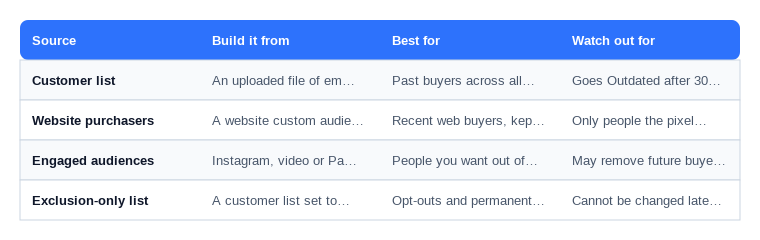
What audience should I exclude?
| Source | Build it from | Best for | Watch out for |
|---|---|---|---|
| Customer list | An uploaded file of emails or phone numbers | Past buyers across all channels | Goes Outdated after 30 days; match score may be low |
| Website purchasers | A website custom audience based on the Purchase event | Recent web buyers, kept fresh by the pixel | Only people the pixel saw |
| Engaged audiences | Instagram, video or Page engagement audiences | People you want out of cold prospecting | May remove future buyers |
| Exclusion-only list | A customer list set to Only exclusions | Opt-outs and permanent do-not-show lists | Cannot be changed later or used for a lookalike |
Meta’s custom audiences overview notes that you can create an exclusion-only custom audience, a customer list that can only be used to exclude people.
How do I build the customer audience?
- Open Audiences in Ads Manager, click Create audience and choose Custom audience.
- Select Customer list, then Next, and format your file following Meta’s guidelines.
- Choose Inclusions or exclusions, or Only exclusions, then upload the file or paste values.
- Name it with an Audience label such as “Customers, excluded” so it is easy to find.
- Map the identifiers, click Import and create, and wait until the status reads Ready.
Meta hashes the identifiers before matching, and the Match score column (out of ten) shows how well the list matched profiles. Adding more emails and phone numbers can improve it. Meta’s customer list guidance says a list should include at least 1,000 customers. The steps come from How to create a customer list custom audience.
How do I exclude them in the ad set?
On a standard Sales, Leads or App promotion ad set, per Meta’s custom and lookalike audience steps:
- Open the ad set and find the Audience section.
- Click Show more controls.
- Under Custom audience exclusion (or Exclude these custom audiences), search for and select your customer audience.
- Finish the ad set and publish.
On Awareness, Traffic and Engagement ad sets, the same box appears under Controls, Show more controls, Exclude these custom audiences. For Advantage+ audience, Meta lists excluding custom audiences as one of the controls, and says you cannot exclude lookalike audiences there. The settings behind it are in Advantage+ audience controls vs suggestions.
What is Customer lifecycle strategy?
It is Meta’s built-in version for the Sales objective:
- Create a customer list or purchase-event website audience of existing customers first.
- Create a campaign with the Sales objective and open the Ad Set.
- Find Customer lifecycle strategy and choose Acquire new customers.
- Select your audience under Exclude existing customers, and optionally Also exclude engaged audiences.
- Publish and judge it on new customer metrics.
Meta says it applies specialised treatments to enhance exclusion coverage and maximise reach to new customers. The alternative option, Get conversions from all audiences, is for lower cost per result, and you can still include or exclude audiences yourself or for the whole ad account in Advertising settings.
How do I keep the exclusion working?
An exclusion is only as current as its list. Meta marks a customer list as Outdated when it has not been updated for more than 30 days, which may affect delivery; click Update list to refresh it. Website purchaser audiences update from pixel events, so check that your Purchase event still fires; the common failures are in Why does my Meta pixel track PageView but not Purchase?
Check also for overlap: Facebook Audience Overlap? How to Check and Fix It shows how to see whether your prospecting audiences still share people.
What can go wrong?
- Too-small exclusion. Meta says a custom audience below 1,000 customers may hurt delivery; a thin list excludes few people.
- Low match score. If few emails match Meta profiles, many customers stay in your prospecting audience.
- Over-exclusion. Excluding all engagers can remove people who would buy; start with purchasers only.
- New customer CPA misread. Overall CPA will usually rise; read the new-customer figure.
- Retargeting ad sets. Do not apply the exclusion there, or you remove the audience on purpose.
Can software help?
Bach.ai audits a connected Meta account, ranks what it finds by estimated recoverable spend, and applies a supported Meta change, by default, only after you approve it (Auto-Pilot is opt-in) on an active paid plan; an ad set that reaches existing buyers is the kind of leak the audit is for. Verify the setting yourself with the Meta ads audit checklist, and note the list upload stays in Meta.
FAQ
How long does an exclusion take to start working?
A new customer list shows Populating until it is Ready; Meta says hashing a large list may take a few minutes. Do not expect the exclusion to apply until the status reads Ready, so add the audience before you launch.
Does excluding customers raise my CPA?
Usually, yes, which is what Meta says about Customer lifecycle strategy: it may increase cost per result by reducing the audience to new prospects. Compare new customer CPA, not overall CPA, to decide.
Should I exclude customers from retargeting too?
No, retargeting exists to reach people who showed interest. Exclude recent purchasers from retargeting instead, and keep past customers in a separate retention campaign with its own offer. Retargeting still needs an audience of interested people, so treat past customers and recent purchasers as two separate groups.
Can I exclude customers without a list?
Yes, with a website custom audience built from the Purchase event, if your pixel records purchases. It will miss customers who bought offline or before the pixel, which a customer list covers.
Sources: Meta Business Help Center, Create a campaign to acquire new customers, How to use custom or lookalike audiences, How to create a customer list custom audience, About custom audiences, How to create a campaign using Advantage+ audience (all checked 24 Nov 2026).